Workflows and presets
This guide describes the built-in ingestion presets of the Data and Search Platform and how to configure them. The platform refers to this configurable workflow model as "bring your own workflow" (BYOW).
Prerequisites
-
The Data and Search Platform is deployed:
https://sherlock.{ingressDomain} -
You can reach it with one of:
curl, the Sherlock Python SDK (sherlock-client), or the platform CLI (pharia). -
You have created a search store — see Creating search stores.
Client setup
Each example below is shown for three clients. All three call the same REST API at https://sherlock.{ingressDomain}/api/v1; the SDK and the CLI wrap the requests shown in the curl tab. Every request requires a bearer token. The deployment’s IAM sidecar validates the token and adds the caller’s user identity to the request, and Sherlock authorizes the request against that identity.
-
curl
-
Python SDK
-
Platform CLI
Log in once with the platform CLI, then export the deployment URL and a token:
pharia --env aleph-alpha iam login    # one-time OAuth login via your browser

export SHERLOCK_URL="https://sherlock.{ingressDomain}"
export AA_TOKEN="$(pharia --env aleph-alpha iam token)"
Pass -H "Authorization: Bearer $AA_TOKEN" on every call. A platform token from any other source also works; the API only reads the header. Requests with a JSON body use --json (curl 7.82.0 or later), which sends the body and sets the Content-Type and Accept headers to application/json. To read the body from a file, use --json @body.json.
Install the client from the Aleph Alpha package index:
pip install sherlock-client --extra-index-url https://alephalpha.jfrog.io/artifactory/api/pypi/holmes/simpleThen create a client for the deployment and a handle for the store whose workflows you are configuring:
import os

from sherlock import SyncSherlock

client = SyncSherlock(
    url="https://sherlock.{ingressDomain}",
    token=os.environ["AA_TOKEN"],
)

store = client.v1.search_stores("<store-id>")
url and token default to the SHERLOCK_BASE_URL and SHERLOCK_TOKEN environment variables, so SyncSherlock() without arguments works when those variables are set. Sherlock is the async client and has the same API. Use either client as a context manager (with SyncSherlock(...) as client:) to close the connection pool when you finish.
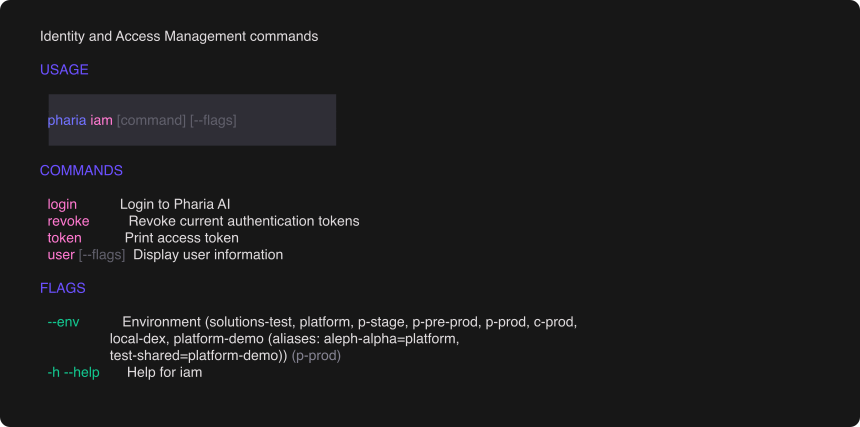
The platform CLI (pharia) handles authentication. Log in once; every subsequent command uses the cached token:
pharia iam login # one-time OAuth login via your browserSelect the environment with the global --env flag, for example pharia --env aleph-alpha iam login. The CLI caches tokens per environment and refreshes them automatically. To reach a deployment that the CLI does not know, pass --base-url https://sherlock.{ingressDomain} or set PHARIA_SHERLOCK_URL. To use the token in your own tooling, print it with TOKEN=$(pharia iam token).
Built-in presets
Every ingestion workflow is based on a preset that defines defaults for extraction, chunking, and embedding. Select a preset when you create a workflow:
| Preset | Description |
|---|---|
|
Full pipeline: extraction, chunking, and embeddings. Use it for most use cases. |
|
|
Configuring a workflow
Create a workflow on your search store. Specify a preset and the parameters to use. Parameters are grouped by pipeline module: one group per reader, plus chunker and vectorize. The create call currently also requires the run-input schema:
-
curl
-
Python SDK
-
Platform CLI
parameters and schema are plain objects in the request body. This example uses the text-extraction document from Text extraction below:
curl "$SHERLOCK_URL/api/v1/search-stores/<store-id>/workflows" \
  -H "Authorization: Bearer $AA_TOKEN" \
  --json '{
    "name": "text-ingestion",
    "workflow_name": "DocumentAI",
    "parameters": {
      "chunker": {
        "batch_size": 1000,
        "chunk_overlap": 600,
        "chunk_size": 4096,
        "include_image_descriptions": false,
        "kind": "recursive"
      },
      "docx_reader": {
        "batch_size": 100,
        "kind": "doc",
        "split_level": 1
      },
      "markdown_reader": {
        "batch_size": 100,
        "kind": "markdown"
      },
      "pdf_reader": {
        "batch_size": 10,
        "kind": "pdf_text",
        "pdf_backend": "pdfboss"
      },
      "plaintext_reader": {
        "batch_size": 100,
        "kind": "plaintext",
        "max_content_size": 500000,
        "min_space_ratio": 0.02
      },
      "pptx_reader": {
        "batch_size": 100,
        "include_notes": true,
        "kind": "pptx"
      },
      "vectorize": {
        "batch_size": 10,
        "distance": "cosine",
        "kind": "openai_vectorize",
        "modality": "text",
        "provider": "pharia",
        "vector_type": "dense"
      },
      "xlsx_reader": {
        "batch_size": 100,
        "kind": "excel",
        "split_level": 2
      }
    },
    "schema": {
      "type": "object",
      "properties": {
        "source": {
          "description": "Source path, connector URI, or list thereof",
          "anyOf": [
            {"type": "string"},
            {"type": "array", "items": {"type": "string"}}
          ]
        }
      },
      "additionalProperties": true
    }
  }'
import json
from pathlib import Path
workflow = store.workflows.create(
name="text-ingestion",
workflow_name="DocumentAI",
parameters=json.loads(Path("parameters.json").read_text()),
schema=json.loads(Path("input-schema.json").read_text()),
)
print(workflow.id)pharia --env aleph-alpha sherlock workflows create <store-id> \
--name text-ingestion \
--workflow-name DocumentAI \
--parameters @parameters.json \
--schema @input-schema.jsonThe schema property (the run-input schema) is currently required but planned for deprecation.
The following sections contain two complete parameters documents that you can use without changes. Always send the whole document. Updates replace the entire object and do not merge it, so workflows update takes the same shape.
Text extraction
pdf_reader.kind: "pdf_text" extracts the text layer directly from the PDF. It is fast, low-cost, and the recommended default for digitally created documents. This configuration uses no vision model, so the document has no vision_reader group:
{
  "chunker": {
    "batch_size": 1000,
    "chunk_overlap": 600,
    "chunk_size": 4096,
    "include_image_descriptions": false,
    "kind": "recursive"
  },
  "docx_reader": {
    "batch_size": 100,
    "kind": "doc",
    "split_level": 1
  },
  "markdown_reader": {
    "batch_size": 100,
    "kind": "markdown"
  },
  "pdf_reader": {
    "batch_size": 10,
    "kind": "pdf_text",
    "pdf_backend": "pdfboss"
  },
  "plaintext_reader": {
    "batch_size": 100,
    "kind": "plaintext",
    "max_content_size": 500000,
    "min_space_ratio": 0.02
  },
  "pptx_reader": {
    "batch_size": 100,
    "include_notes": true,
    "kind": "pptx"
  },
  "vectorize": {
    "batch_size": 10,
    "distance": "cosine",
    "kind": "openai_vectorize",
    "modality": "text",
    "provider": "pharia",
    "vector_type": "dense"
  },
  "xlsx_reader": {
    "batch_size": 100,
    "kind": "excel",
    "split_level": 2
  }
}
Like pdf_reader, docx_reader and xlsx_reader select their implementation with kind. The default kinds are doc and excel, which use anydoc. They parse the file into markdown content blocks and start a new page at each heading. split_level sets the heading level that starts a new page. For documents without headings, max_page_chars (default 10000) limits the page size. Each Excel sheet surfaces as a level-2 heading, so the default split_level: 2 gives one page per sheet. The previous implementations stay available as "kind": "docx" (python-docx) and "kind": "xlsx" (openpyxl).
|
Version availability
The |
With this configuration, scanned pages and pages whose content is in diagrams produce empty or garbled text. Use the vision configuration for these documents. For documents that mix digital and scanned pages, set pdf_reader.kind to smart_pdf_router instead. It extracts the text of each page that has a usable text layer and sends only the other pages to the vision model. It also requires a vision_reader group. See Recipe: per-page routing.
Vision and OCR
Set pdf_reader.kind to pdf_rasterizer to render every page to an image instead of reading its text layer. This requires a vision_reader group, which converts the images to text. The rest of the document does not change:
{
  "chunker": {
    "batch_size": 1000,
    "chunk_overlap": 600,
    "chunk_size": 4096,
    "include_image_descriptions": false,
    "kind": "recursive"
  },
  "docx_reader": {
    "batch_size": 100,
    "kind": "doc",
    "split_level": 1
  },
  "markdown_reader": {
    "batch_size": 100,
    "kind": "markdown"
  },
  "pdf_reader": {
    "batch_size": 10,
    "kind": "pdf_rasterizer",
    "pdf_backend": "pdfboss"
  },
  "plaintext_reader": {
    "batch_size": 100,
    "kind": "plaintext",
    "max_content_size": 500000,
    "min_space_ratio": 0.02
  },
  "pptx_reader": {
    "batch_size": 100,
    "include_notes": true,
    "kind": "pptx"
  },
  "vectorize": {
    "batch_size": 10,
    "distance": "cosine",
    "kind": "openai_vectorize",
    "modality": "text",
    "provider": "pharia",
    "vector_type": "dense"
  },
  "vision_reader": {
    "batch_size": 1,
    "extra_body": {
      "chat_template_kwargs": {
        "thinking": false
      }
    },
    "max_in_flight": 16,
    "model": "rednote-hilab/dots.mocr",
    "provider": "d_inference",
    "temperature": 0,
    "timeout": 120
  },
  "xlsx_reader": {
    "batch_size": 100,
    "kind": "excel",
    "split_level": 2
  }
}
vision_reader does not need a kind, because only one module implements it; its kind defaults to vision. For pdf_reader, the kind field selects pdf_text, pdf_rasterizer, smart_pdf_router, or pdf_router. vision_reader requires provider and model; there is no default endpoint. They identify an inference deployment, not an embedding deployment. In this example, it is a vision-OCR model served through d_inference.
extra_body is sent to the model unchanged on every call; this example disables the model’s thinking mode. temperature: 0 makes sampling deterministic, so the same page always produces the same text. Use this setting for OCR. If you do not set it, the model server’s default applies (Holmes builds before 0.8.7 ignore the field). batch_size: 1 with max_in_flight: 16 sends one page per call, with up to sixteen concurrent calls. Use this configuration when each unit of work is a model request rather than local computation.
This configuration is slower and more expensive per page than pdf_text. Set the timeout for the slowest page you need to process, not for the average page.
See Configuring workflows for the full parameter surface and the CLI-based lifecycle.
Run the new workflow the same way as the default workflow. See Ingesting files.
Updating parameters
-
curl
-
Python SDK
-
Platform CLI
Send the whole parameters document, not only the groups you changed. This body switches the workflow created above to the vision configuration: pdf_reader.kind is pdf_rasterizer and a vision_reader group is added:
curl -X PUT "$SHERLOCK_URL/api/v1/search-stores/<store-id>/workflows/<workflow-id>" \
  -H "Authorization: Bearer $AA_TOKEN" \
  --json '{
    "parameters": {
      "chunker": {
        "batch_size": 1000,
        "chunk_overlap": 600,
        "chunk_size": 4096,
        "include_image_descriptions": false,
        "kind": "recursive"
      },
      "docx_reader": {
        "batch_size": 100,
        "kind": "doc",
        "split_level": 1
      },
      "markdown_reader": {
        "batch_size": 100,
        "kind": "markdown"
      },
      "pdf_reader": {
        "batch_size": 10,
        "kind": "pdf_rasterizer",
        "pdf_backend": "pdfboss"
      },
      "plaintext_reader": {
        "batch_size": 100,
        "kind": "plaintext",
        "max_content_size": 500000,
        "min_space_ratio": 0.02
      },
      "pptx_reader": {
        "batch_size": 100,
        "include_notes": true,
        "kind": "pptx"
      },
      "vectorize": {
        "batch_size": 10,
        "distance": "cosine",
        "kind": "openai_vectorize",
        "modality": "text",
        "provider": "pharia",
        "vector_type": "dense"
      },
      "vision_reader": {
        "batch_size": 1,
        "extra_body": {
          "chat_template_kwargs": {
            "thinking": false
          }
        },
        "max_in_flight": 16,
        "model": "rednote-hilab/dots.mocr",
        "provider": "d_inference",
        "temperature": 0,
        "timeout": 120
      },
      "xlsx_reader": {
        "batch_size": 100,
        "kind": "excel",
        "split_level": 2
      }
    }
  }'
import json
from pathlib import Path
store.workflows("<workflow-id>").update(
parameters=json.loads(Path("parameters.json").read_text()),
)pharia --env aleph-alpha sherlock workflows update <store-id> <workflow-id> \
--parameters @parameters.jsonUpdates replace the entire parameters object and do not merge it. Send one of the full documents above with your change applied. If you send only the changed group, every other group reverts to its default. To switch a text workflow to the vision configuration, change pdf_reader.kind to pdf_rasterizer, add the vision_reader group, and send the whole document.
The change applies only to future runs. The platform does not reprocess content that is already indexed.
Advanced: custom workflows and modules
In addition to the built-in presets, the workflow engine supports custom workflows and processing modules written in code, for example an enrichment module for a specific document type. This extension mechanism is intended for platform engineering teams, not for application developers who use the API. See For workflow authors.