Creating search stores
This guide describes how to create and configure a search store. A search store is the container in which the Data and Search Platform holds your documents' embeddings and from which it serves search requests.
Prerequisites
-
The Data and Search Platform is deployed:
https://sherlock.{ingressDomain} -
You can reach it with one of:
curl, the Sherlock Python SDK (sherlock-client), or the platform CLI (pharia). -
You understand the search store concept — see Core concepts.
|
About the
sherlock hostname
|
Client setup
Each example below is shown for three clients. All three call the same REST API at https://sherlock.{ingressDomain}/api/v1; the SDK and the CLI wrap the requests shown in the curl tab. Every request requires a bearer token. The deployment’s IAM sidecar validates the token and adds the caller’s user identity to the request, and Sherlock authorizes the request against that identity.
-
curl
-
Python SDK
-
Platform CLI
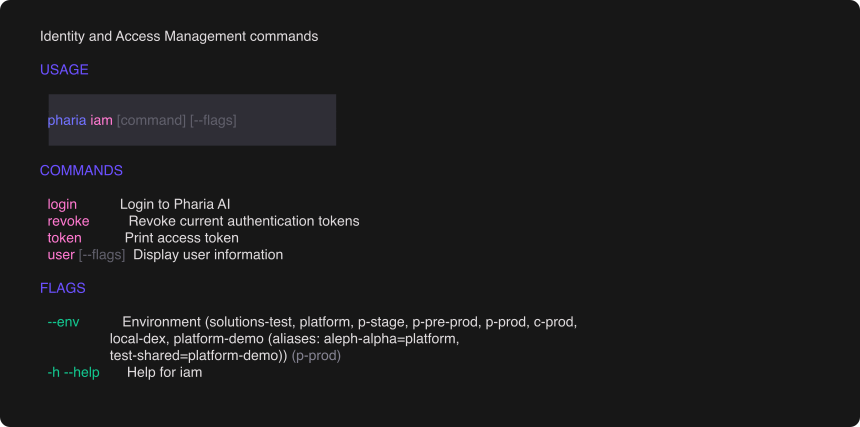
Log in once with the platform CLI, then export the deployment URL and a token:
pharia --env aleph-alpha iam login    # one-time OAuth login via your browser

export SHERLOCK_URL="https://sherlock.{ingressDomain}"
export AA_TOKEN="$(pharia --env aleph-alpha iam token)"
Pass -H "Authorization: Bearer $AA_TOKEN" on every call. A platform token from any other source also works; the API only reads the header. Requests with a JSON body use --json (curl 7.82.0 or later), which sends the body and sets the Content-Type and Accept headers to application/json. To read the body from a file, use --json @body.json.
Install the client from the Aleph Alpha package index:
pip install sherlock-client --extra-index-url https://alephalpha.jfrog.io/artifactory/api/pypi/holmes/simpleThen create a client for the deployment:
import os

from sherlock import SyncSherlock

client = SyncSherlock(
    url="https://sherlock.{ingressDomain}",
    token=os.environ["AA_TOKEN"],
)
url and token default to the SHERLOCK_BASE_URL and SHERLOCK_TOKEN environment variables, so SyncSherlock() without arguments works when those variables are set. Sherlock is the async client and has the same API. Use either client as a context manager (with SyncSherlock(...) as client:) to close the connection pool when you finish.
The platform CLI (pharia) handles authentication. Log in once; every subsequent command uses the cached token:
pharia iam login # one-time OAuth login via your browserSelect the environment with the global --env flag, for example pharia --env aleph-alpha iam login. The CLI caches tokens per environment and refreshes them automatically. To reach a deployment that the CLI does not know, pass --base-url https://sherlock.{ingressDomain} or set PHARIA_SHERLOCK_URL. To use the token in your own tooling, print it with TOKEN=$(pharia iam token).
1. Choose your embedding configuration
Each entry in a store’s models array describes one vector space. The following table lists all accepted values:
| Field | Accepted values | Notes |
|---|---|---|
|
any model identifier your deployment exposes |
Free-form string, normalised to lowercase ( |
|
|
|
|
|
|
|
|
|
|
positive integer, or omitted |
The embedding model’s output size. Omit it only for variable-width vectors such as |
|
per-vector index tuning |
Optional low-level override: |
Any combination of these enum values passes validation. A typo in type, distance, or modality is rejected as an invalid value; it is not silently mapped to another value.
All stores with the same combination of type, modality, distance, and dimension share one vector-database collection. That collection must exist before you can create the store; see how search stores are stored. GET /api/v1/collections lists the provisioned collections. If you choose a configuration that is not provisioned, the API returns 422 Collection Not Provisioned (see Troubleshooting). A platform admin can provision it on request.
2. Create a search store
-
curl
-
Python SDK
-
Platform CLI
curl "$SHERLOCK_URL/api/v1/search-stores" \
  -H "Authorization: Bearer $AA_TOKEN" \
  --json '{
    "name": "my-store",
    "models": [
      {
        "embedding_model": "your-embedding-model",
        "type": "dense",
        "dimension": 1024,
        "distance": "cosine",
        "modality": "text"
      }
    ],
    "fusion_strategy": {"type": "rrf", "params": {"k": 60}},
    "access_policy": "private"
  }'
store = client.v1.search_stores.create(
name="my-store",
models=[
{
"embedding_model": "your-embedding-model",
"type": "dense",
"dimension": 1024,
"distance": "cosine",
"modality": "text",
}
],
fusion_strategy={"type": "rrf", "params": {"k": 60}},
access_policy="private",
)
print(store.id)create returns a store handle. store.id is the ID you use in later calls. store.files, store.workflows, and store.documents are the store-scoped namespaces for ingestion and retrieval.
pharia --env aleph-alpha sherlock stores create \
  --name my-store \
  --models '[{
    "embedding_model": "your-embedding-model",
    "type": "dense",
    "dimension": 1024,
    "distance": "cosine",
    "modality": "text"
  }]' \
  --fusion-strategy '{"type": "rrf", "params": {"k": 60}}' \
  --access-policy private
JSON flag values also accept @file or @- for stdin.
The response includes the store’s id. Use it in every subsequent request. access_policy defaults to private: only you can see or use the store.
For hybrid search, add a second models entry with "type": "bm25", "modality": "text", "distance": "dot", and no other fields. fusion_strategy controls how the dense and lexical results are combined: rrf, convex, anchored, dbsf, or dense_only. If you omit it for a dense + bm25 pair, the default is convex when the dense entry uses cosine or dot, and rrf otherwise. A non-empty weights is rejected.
|
Version availability
Hybrid |
models cannot be changed after creation. Search filters on the declared model, so a change would make every vector already written unreachable. To use a different configuration, create a new store.
Declaring filterable metadata
Ingestion can attach arbitrary metadata to chunks. The platform stores all of it under the metadata. prefix in the vector payload. Metadata attached at file upload is stored under the user sub-namespace, so declare those fields with the user. prefix ("path": "user.site"). To filter on a metadata field, declare it as an index when you create the store:
-
curl
-
Python SDK
-
Platform CLI
curl "$SHERLOCK_URL/api/v1/search-stores" \
  -H "Authorization: Bearer $AA_TOKEN" \
  --json '{
    "name": "my-store",
    "models": [
      {
        "embedding_model": "your-embedding-model",
        "type": "dense",
        "dimension": 1024,
        "distance": "cosine",
        "modality": "text"
      }
    ],
    "metadata_indexes": [
      {"path": "language",     "type": "string"},
      {"path": "year",         "type": "integer"},
      {"path": "draft",        "type": "boolean"},
      {"path": "published_at", "type": "datetime"}
    ]
  }'
store = client.v1.search_stores.create(
name="my-store",
models=[
{
"embedding_model": "your-embedding-model",
"type": "dense",
"dimension": 1024,
"distance": "cosine",
"modality": "text",
}
],
metadata_indexes=[
{"path": "language", "type": "string"},
{"path": "year", "type": "integer"},
{"path": "draft", "type": "boolean"},
{"path": "published_at", "type": "datetime"},
],
)pharia --env aleph-alpha sherlock stores create \
--name my-store \
--models @models.json \
--metadata-indexes '[
{"path": "language", "type": "string"},
{"path": "year", "type": "integer"},
{"path": "draft", "type": "boolean"},
{"path": "published_at", "type": "datetime"}
]'Each entry has a path and a type. The path is the metadata key; the platform resolves it to metadata.<path> for indexing and filtering. The type selects the index kind in the vector database, so it must match the type of the values your ingestion writes. The following table lists all supported types:
type |
Index created | Filter it with | Notes |
|---|---|---|---|
|
keyword |
|
Use for IDs, language codes, tags, and enum-like values. If declared with |
|
integer |
|
|
|
float |
|
Use range bounds, not |
|
bool |
|
|
|
datetime |
|
Write the values as RFC 3339 timestamps ( |
Any other type is rejected as an unsupported metadata index type. A blank path is also rejected.
|
Version availability
|
Before you choose your fields, note the following constraints:
-
You must declare a field to filter on it. A search whose filter references an undeclared
metadata.<path>is rejected with400, and the error names the field: "field is not filterable on this search store; declare it in metadata_indexes". The vector database does not filter on unindexed fields, so the store validates the filter before sending it and returns a specific error. Declare every metadata field you intend to filter on. -
System fields are always filterable:
file_id,document_id,page_id,chunk_id,workflow_id,workflow_run_id. Do not declare them. -
You can declare indexes only at creation. The API does not support updating them, because rebuilding an index over an existing collection can be expensive. To add a field later, create a new store. Declarations are additive, and a path’s type cannot change once set. Because collections are shared by geometry, the indexes on the underlying collection are the union of the declarations of all stores that share it. Each store still accepts filters only on its own declared fields: an index declared by another store on the same collection does not make the field filterable in yours.
3. Share a search store (optional)
To make a store readable by any authenticated user, update its access_policy:
-
curl
-
Python SDK
-
Platform CLI
curl -X PUT "$SHERLOCK_URL/api/v1/search-stores/<store-id>" \
  -H "Authorization: Bearer $AA_TOKEN" \
--json '{"access_policy": "public"}'client.v1.search_stores("<store-id>").update(access_policy="public")pharia --env aleph-alpha sherlock stores update <store-id> --access-policy publicTo share with specific users or groups, grant them viewer or writer access:
-
curl
-
Python SDK
-
Platform CLI
curl -X PUT "$SHERLOCK_URL/api/v1/search-stores/<store-id>/permissions" \
  -H "Authorization: Bearer $AA_TOKEN" \
  --json '{
    "add": {
      "viewers": ["user:<user-id>"],
      "writers": ["group:<group-id>"]
    }
  }'
The response contains the store’s full sharing state after the change: access_policy, owner_id, viewers, and writers. To revoke access, send a "remove" object with the same shape. Removes are applied before adds, so a subject listed in both is granted access.
state = client.v1.search_stores("<store-id>").update_permissions(
    add={
        "viewers": ["user:<user-id>"],
        "writers": ["group:<group-id>"],
    },
)

print(state.viewers, state.writers)
To revoke access, pass remove= with the same shape. Both arguments are keyword-only.
pharia --env aleph-alpha sherlock stores permissions <store-id> \
  --add-viewer user:<user-id> \
  --add-writer group:<group-id>
Only the store’s owner can change access_policy, delete the store, or manage its permissions. Any authenticated user can read a public store, and it appears in their store list; see Multi-user isolation and sharing. To stop public sharing, set the policy back to private. To revoke individual grants, send the same subjects under remove instead of add (--remove-viewer/--remove-writer on the CLI).
Validation
-
curl
-
Python SDK
-
Platform CLI
curl "$SHERLOCK_URL/api/v1/search-stores" \
  -H "Authorization: Bearer $AA_TOKEN"
page = client.v1.search_stores.list(limit=20, offset=0)
for store in page:
print(store.id, store.name, store.access_policy)
print(page.total)pharia --env aleph-alpha sherlock stores listThis lists the stores you own and all public stores. Confirm that your new store appears with the expected id.