PhariaAI SDKs
Introduction
|
Intelligence Layer SDK is deprecated! For convenience and easier installation, the Intelligence Layer SDK has been split into three separate SDKs:
This documentation references the new PhariaAI SDKs; however, the same features remain available in the original Intelligence Layer. |
Task
In the PhariaInference SDK, a task transforms an input parameter to an output parameter, similar to a function in mathematics:
Task: Input -> Output
In Python, this is realised by an abstract class with type-parameters and the abstract method do_run in which the actual transformation is implemented:
class Task(ABC, Generic[Input, Output]):

    @abstractmethod
    def do_run(self, input: Input, task_span: TaskSpan) -> Output:
        ...
Input and Output are normal Python datatypes that can be serialised from and to JSON. For this, the PhariaInference SDK relies on Pydantic. The types used are defined in the form of type-aliases PydanticSerializable.
The second parameter task_span is used for tracing, as described below.
do_run is the method that implements a concrete task and must be provided by you. It is executed by the external interface method run of a task:
class Task(ABC, Generic[Input, Output]):
    @final
    def run(self, input: Input, tracer: Tracer) -> Output:
      ...
The signatures of the do_run and run methods differ only in the tracing parameters.
Levels of abstraction
Even though the task concept is generic, the main purpose for a task is of course to make use of an LLM for a transformation. Tasks are defined at different levels of abstraction. Higher level tasks (also called use cases) reflect a typical user problem, whereas lower level tasks are used to interface with an LLM on a generic or technical level.
Typical examples of higher level tasks (use cases) are the following:
-
Answer a question based on a given document:
QA: (Document, Question) → Answer -
Generate a summary of a given document:
Summary: Document → Summary
Examples of lower level tasks are the following:
-
Generate text based on an instruction and some context:
Instruct: (Context, Instruction) → Completion -
Chunk a text in smaller pieces at optimised boundaries (typically to make it fit into an LLM’s context size):
Chunk: Text → [Chunk]
Trace
A task implements a workflow. It processes its input, passes it on to subtasks, processes the outputs of the subtasks, and builds its own output. This workflow can be represented in a trace. For this, a task’s run method takes a Tracer that takes care of storing details about the steps of this workflow, including the tasks that have been invoked along with their input and output and timing information.
To represent this tracing we use the following concepts:
-
A
Traceris passed to a task’srunmethod and provides methods for openingSpans orTaskSpans. -
A
Spanis aTracerthat groups multiple logs and runtime durations together as a single, logical step in the workflow. -
A
TaskSpanis aSpanthat groups multiple logs together with the task’s specific input and output. An openedTaskSpanis passed toTask.do_run. Since aTaskSpanis aTracerado_runimplementation can pass this instance on torunmethods of subtasks.
The following diagram illustrates these relationships:
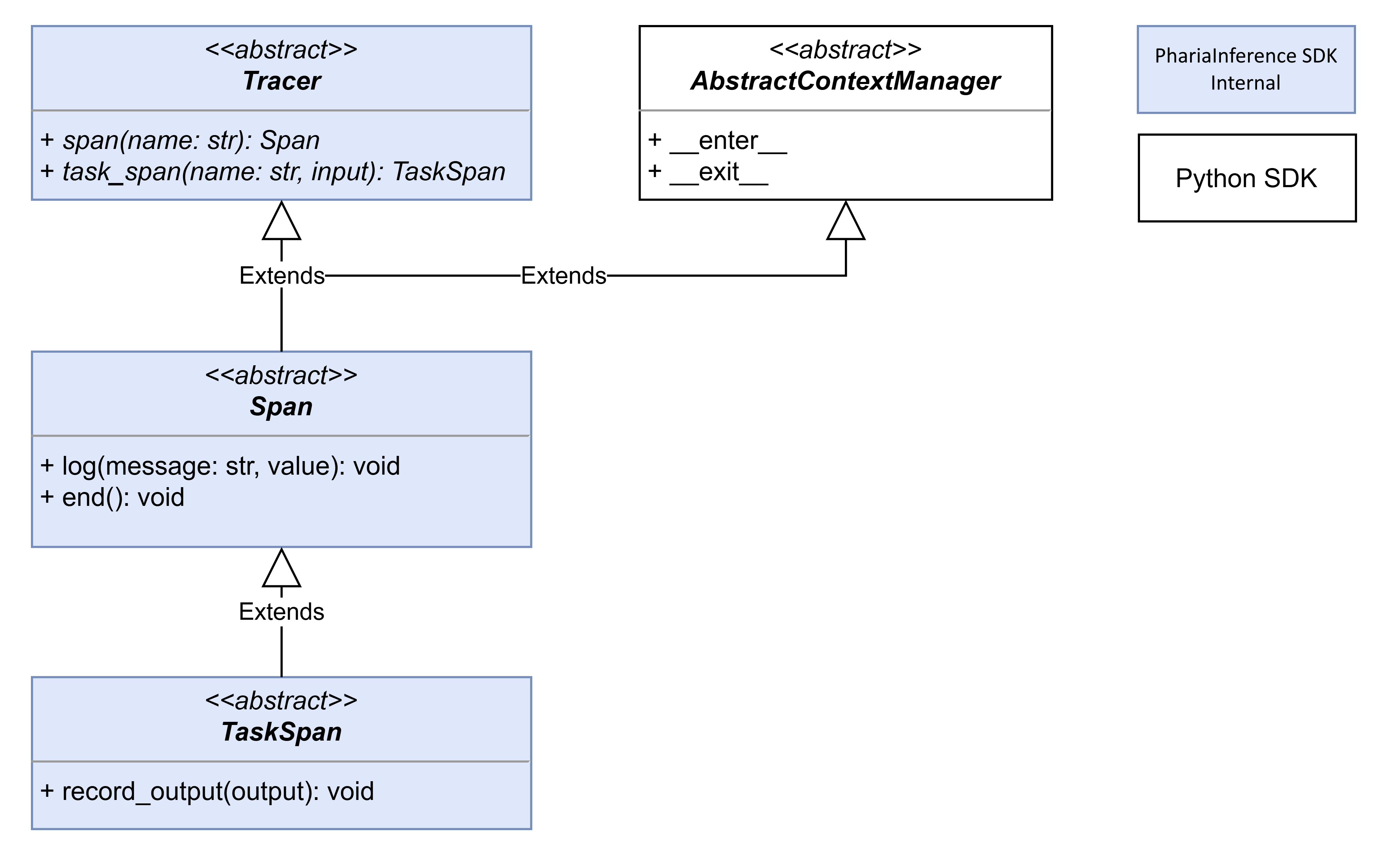
Each of these concepts is implemented in form of an abstract base class. The PhariaInference SDK provides several concrete implementations that store the actual traces in different backends. For each backend, each of the three abstract classes Tracer, Span, and TaskSpan needs to be implemented. The top-level Tracer implementations are the following:
-
The
NoOpTraceris used when no tracing information is to be stored. -
The
InMemoryTracerstores all traces in an in-memory data structure and is helpful in tests or Jupyter notebooks. -
The
FileTracerstores all traces in a JSON file. -
The
OpenTelemetryTraceruses an OpenTelemetryTracerto store the traces in an OpenTelemetry backend.
Evaluation
An important part of the PhariaStudio SDK is the tooling that helps to evaluate custom tasks. Evaluation helps to measure how well the implementation of a task performs given real world examples. The outcome of an entire evaluation process is an aggregated evaluation result that consists of metrics aggregated over all examples.
The evaluation process helps to:
-
Optimise a task’s implementation by comparing and verifying if changes improve the performance.
-
Compare the performance of one implementation of a task with that of other (already existing) implementations.
-
Compare the performance of models for a given task implementation.
-
Verify how changes to the environment (such as a new model version or new finetuning version) affect the performance of a task.
Dataset
The basis of an evaluation is a set of examples for the specific task-type to be evaluated. A single Example consists of:
-
An instance of the
Inputfor the specific task. -
Optionally, an expected output that can be anything that makes sense in context of the specific evaluation.
For example, the expected output might be, in the case of a classification, the correct classification result. In the case of a Q&A, it could contain a golden answer. However, if an evaluation is only about comparing results with the results from other runs, the expected output could be empty.
To enable reproducibility of evaluations, datasets are immutable. A single dataset can be used to evaluate all tasks of the same type, that is, with the same Input and Output types.
Evaluation process
The PhariaStudio SDK supports different kinds of evaluation techniques. Most important are:
-
Computing absolute metrics for a task where the aggregated result can be compared with results of previous result in a way that they can be ordered. Text classification could be a typical use case for this. In that case the aggregated result could contain metrics like accuracy which can easily compared with other aggregated results.
-
Comparing the individual outputs of different runs (all based on the same dataset) in a single evaluation process and produce a ranking of all runs as an aggregated result. This technique is useful when it is hard to come up with an absolute metric to evaluate a single output, but it is easier to compare two different outputs and decide which one is better. A typical use case might be summarisation.
To support these techniques, the PhariaStudio SDK differentiates between three consecutive steps:
-
Run a task by feeding it all inputs of a dataset and collecting all outputs.
-
Evaluate the outputs of one or several runs and produce an evaluation result for each example. Typically, a single run is evaluated if absolute metrics can be computed, and several runs are evaluated when the outputs of runs are to be compared.
-
Aggregate the evaluation results of one or several evaluation runs into a single object containing the aggregated metrics. Aggregating over several evaluation runs supports amending a previous comparison result with comparisons of new runs without the need to re-execute the previous comparisons again.
The following table shows how these three steps are represented in code:
| Step | Executor | Custom Logic | Repository |
|---|---|---|---|
1 Run |
|
|
|
2 Evaluate |
|
|
|
3 Aggregate |
|
|
|
The columns indicate the following:
-
"Executor" lists concrete implementations provided by the PhariaStudio SDK.
-
"Custom Logic" lists abstract classes that need to be implemented with the custom logic.
-
"Repository" lists abstract classes for storing intermediate results. The PhariaStudio SDK provides different implementations for these. See the next section for details.
Data storage
During an evaluation process a lot of intermediate data is created before the final aggregated result can be produced. To avoid repeating expensive computations if new results are to be produced based on previous ones, all intermediate results are persisted. To do this, the different executor classes use the following repositories:
-
The
DatasetRepositoryoffers methods to manage datasets. TheRunneruses it to read allExamples of a dataset and feeds them to theTask. -
The
RunRepositoryis responsible for storing a task’s output (in the form of anExampleOutput) for eachExampleof a dataset which is created when aRunnerruns a task using this dataset. At the end of a run aRunOverviewis stored containing some metadata concerning the run. TheEvaluatorreads these outputs given a list of runs it needs to evaluate to create an evaluation result for eachExampleof the dataset. -
The
EvaluationRepositoryenables theEvaluatorto store the evaluation result (in the form of anExampleEvaluation) for each example along with anEvaluationOverview. TheAggregatoruses this repository to read the evaluation results. -
The
AggregationRepositorystores theAggregationOverviewcontaining the aggregated metrics on request of theAggregator.
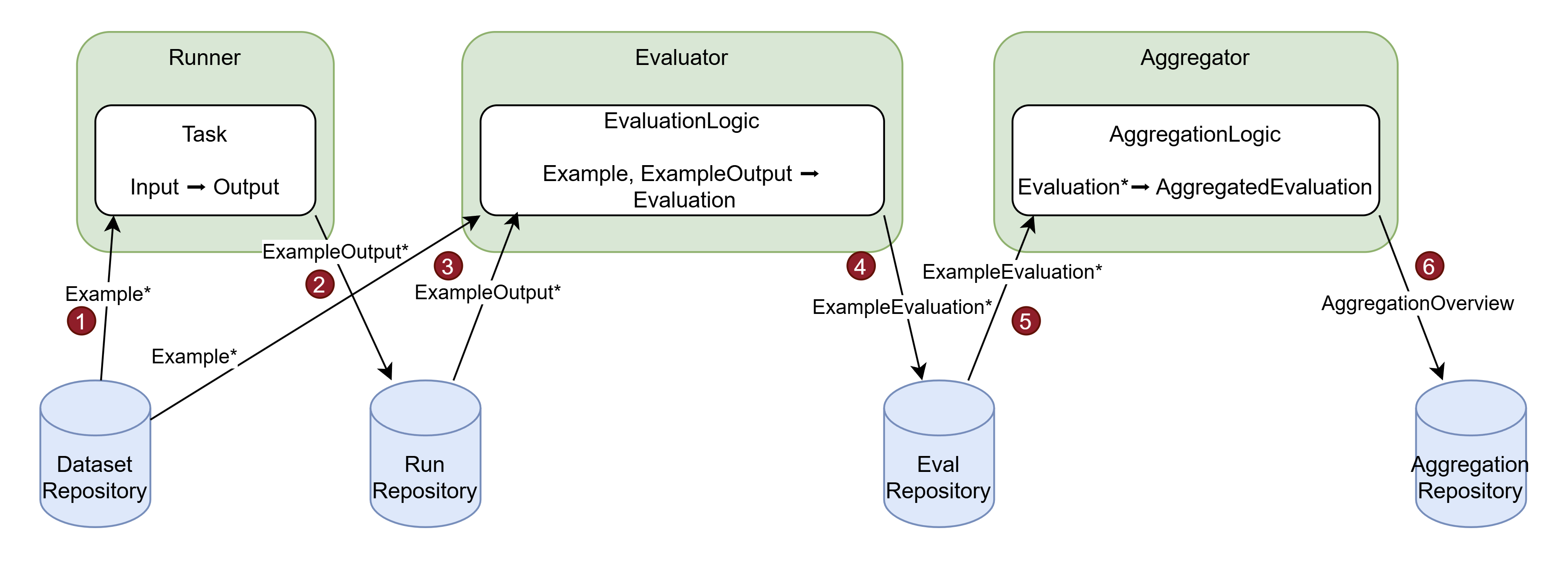
The following diagrams illustrate how the different concepts play together in case of the different types of evaluations:
-
The
Runnerreads theExamples of a dataset from theDatasetRepositoryand runs aTaskfor eachExample.inputto produceOutputs. -
Each
Outputis wrapped in anExampleOutputand stored in theRunRepository. -
The
Evaluatorreads theExampleOutputs for a given run from theRunRepositoryand the correspondingExamplefrom theDatasetRepositoryand uses theEvaluationLogicto compute anEvaluation. -
Each
Evaluationgets wrapped in anExampleEvaluationand stored in theEvaluationRepository. -
The
Aggregatorreads allExampleEvaluations for a given evaluation and feeds them to theAggregationLogicto produce anAggregatedEvaluation. -
The
AggregatedEvalutionis wrapped in anAggregationOverviewand stored in theAggregationRepository.
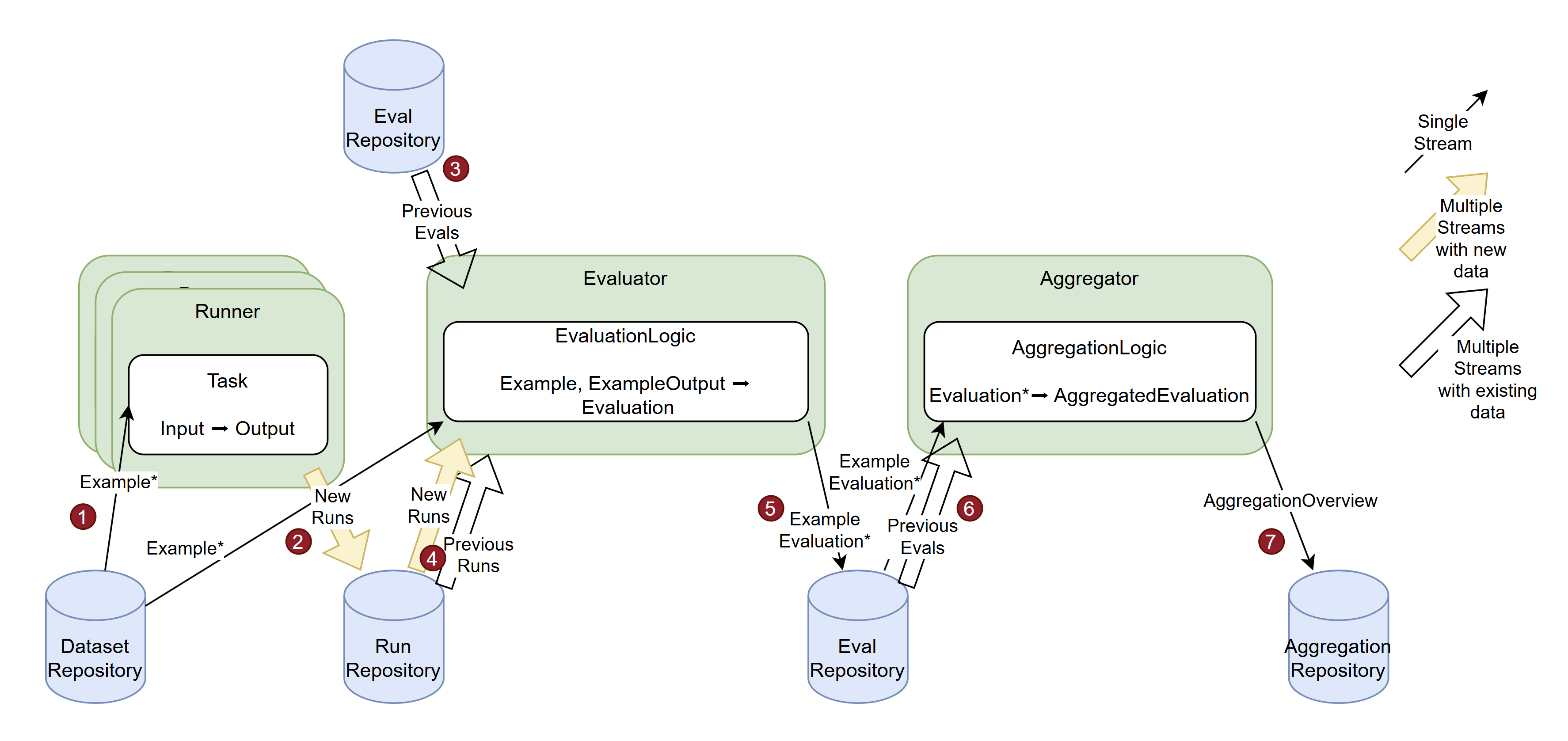
The following diagram illustrates the more complex case of a relative evaluation:
-
Multiple
Runners read the same dataset and produce the correspondingOutputs for differentTasks. -
For each run, all
Outputs are stored in theRunRepository. -
The
Evaluatorgets as input previous evaluations (that were produced on the basis of the same dataset, but by differentTasks) and the new runs of the current task. -
Given the previous evaluations and the new runs the
Evaluatorcan read theExampleOutputs of both the new runs and the runs associated with previous evaluations, collect all that belong to a singleExampleand pass them along with theExampleto theEvaluationLogicto compute anEvaluation. -
Each
Evaluationgets wrapped in anExampleEvaluationand is stored in theEvaluationRepository. -
The
Aggregatorreads allExampleEvaluations from all involved evaluations and feeds them to theAggregationLogicto produce anAggregatedEvaluation. -
The
AggregatedEvalutionis wrapped in anAggregationOverviewand stored in theAggregationRepository.