Data and Search Platform: Core concepts
This article describes the entities the Data and Search Platform manages and how it scopes access per user.
Entity model
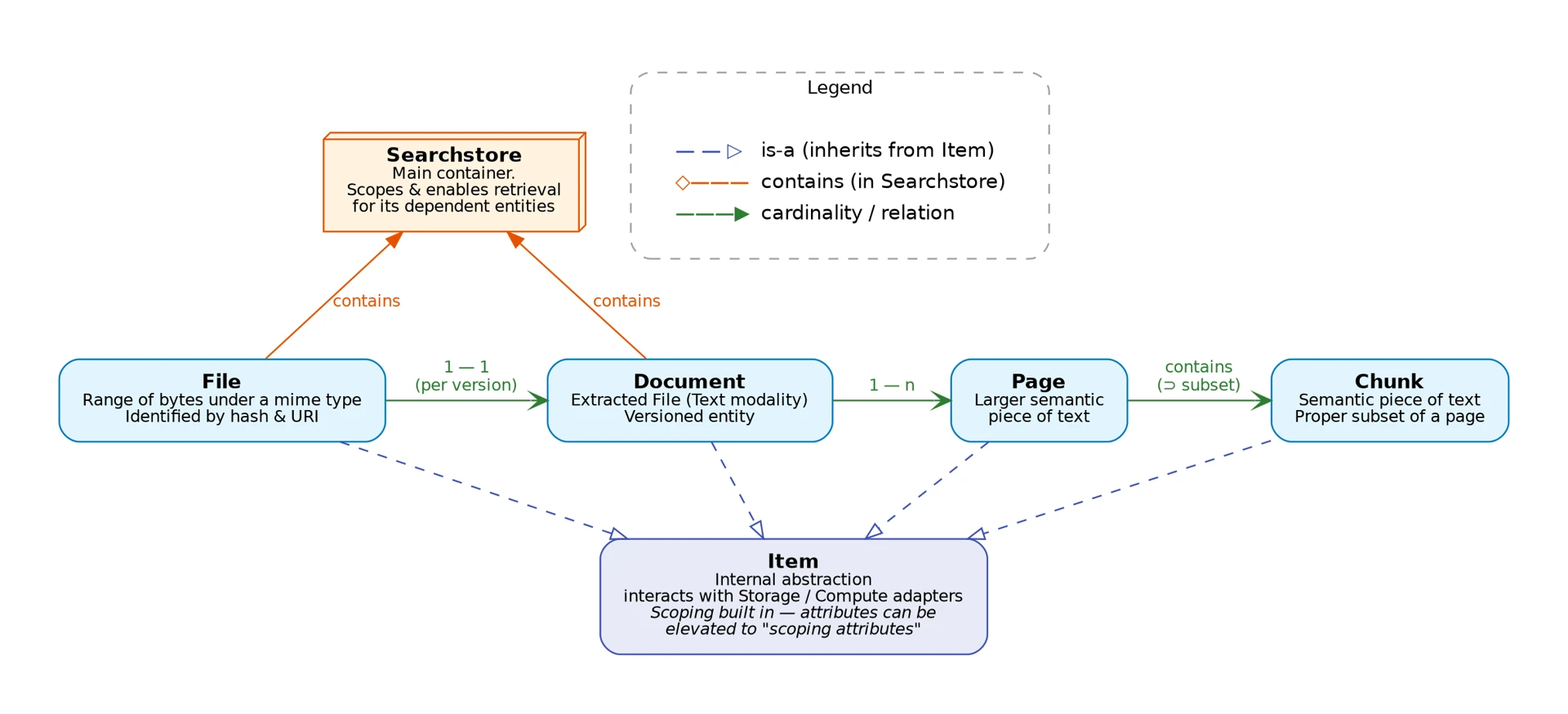
The Search Store is the platform’s central object. It is the unit of storage, transformation, search, and access control. You create a search store, upload files into it, run ingestion workflows on those files, and query the result. Every other entity is scoped inside a search store:
-
Search Store — the top-level container that you create and own. It holds the embedding model configuration for all content inside it. A search store is private by default. You can share it with other users or make it public.
-
File — the raw bytes you upload, stored with a MIME type and identified by hash and URI. Workflows read files and derive new entities from them. They never modify the original file.
-
Document — an extracted, versioned representation of a file. Each document version corresponds 1:1 with a file version and is scoped under its workflow run. A document has one or more pages (or other derived entities, depending on the file type).
-
Page — a larger semantic unit of text within a document (for example, one PDF page).
-
Chunk — a semantic subset of a page’s text. Search retrieves chunks and ranks them against your query.
Multi-user isolation and sharing
Every search store belongs to the user who created it and is private by default: only the owner can see or use it. Access to a store is role-based:
-
Owner — the creator. Has full control, including deleting the store and changing its visibility and permissions.
-
Writer — can ingest and modify content in the store.
-
Viewer — read-only access: listing and searching.
Owners can grant viewer or writer access to individual users or groups, or make the store public, which gives every authenticated user read access. In addition to these per-store roles, a service-level admin role can access any store. Administrative actions emit audit events.
Files, documents, pages, and chunks inherit the access rules of the search store that contains them. There is no per-file permission model. Checking permissions only at the store level reduces load on the authorization service and lets the system scale to more users.
Advanced: how search stores are stored
This section is not required to use the API. It describes how search stores map to vector-database storage, why several stores share one collection, and why store creation can fail with 422 Collection Not Provisioned.
Collections are sharded by geometry, not by store
Each search store is backed by a Collection, the physical storage unit in the vector database (Qdrant). A collection holds one named vector per entry in the store’s models configuration. The collection name is derived from that configuration: one code per vector, joined with _ in type order (dense, sparse, bm25, multi, quantized):
| Part | Values |
|---|---|
modality |
|
vector type |
|
distance |
|
dimension |
appended when fixed, omitted when variable |
For example, a store with 1024-dimensional dense text embeddings scored by cosine distance and a sparse text vector scored by dot product uses the collection tdc1024_tsd. A store with no vector models has no backing collection.
Because the name is derived from the configuration and not allocated per store, all stores with the same geometry share one collection:
store "docs"        (t·d·c·1024 + t·s·d) ┐
store "contracts"   (t·d·c·1024 + t·s·d) ├─▶ collection tdc1024_tsd
store "wiki"        (t·d·c·1024 + t·s·d) ┘   points tagged searchstore_id, filtered on every query

store "screenshots" (i·d·c·512) ──────────▶ collection idc512
A search store is therefore a virtual view on a shared collection. Every point carries the searchstore_id and user_id it belongs to. The platform adds a searchstore_id filter to every query before it reaches the vector database, and rejects any search that would run without this filter. Stores that share a collection cannot read each other’s vectors. The collection indexes these tenant keys, the entity IDs (file, document, page, chunk, workflow, run), and any custom metadata.* fields declared by the stores that use it. The set of custom indexes is the union of the declarations of all stores sharing the collection.
Why stores share collections
Qdrant is not designed for one collection per tenant. Its multitenancy guide recommends "a single collection per embedding model with payload-based partitioning", warns that creating "hundreds and thousands of collections per cluster" causes unsustainable resource overhead, and states that "in Qdrant Cloud, we limit the amount of collections per cluster to 1000". Sharding by geometry limits the number of collections to the number of embedding configurations in use, independent of the number of search stores. This keeps the cost of a search store low enough to create one per project or per user.
Provisioning collections
Collections are global infrastructure, so only platform admins can provision them. Provisioning is done through the API and is possible at any time, not only during environment setup:
| Endpoint | Who | Behaviour |
|---|---|---|
|
platform admin |
Provision the collection and its standard payload indexes for a set of vector models. Idempotent: provisioning an existing collection ensures its indexes and returns it. |
|
any authenticated user |
List provisioned collections. Use it to check which embedding configurations are available before creating a store. |
|
any authenticated user |
Get one collection by name. |
|
platform admin |
Idempotent. Affects every store backed by that collection. |
Admin mutations are audited. Deployments can also pre-provision collections at rollout through the server’s migrate command.
When you create a search store, the API checks that its derived collection exists. Without this check, the failure would only appear later, during ingestion or search. If the collection does not exist, the API returns 422 Collection Not Provisioned with the derived collection name. Ask an admin to provision it, or choose a configuration that already exists. See Troubleshooting.
In addition to the vector database, the platform uses a relational database for metadata and extracted text, object storage for uploaded files, and a workflow orchestration layer that runs ingestion pipelines. See Resource requirements for the sizing impact on your deployment.