Searching your data
This guide describes how to query a search store for content relevant to a user’s question, and how to use filters and citations.
Prerequisites
-
You have a search store with at least one completed ingestion run — see Ingesting files.
-
You can reach the deployment with one of:
curl, the Sherlock Python SDK (sherlock-client), or the platform CLI (pharia).
Client setup
Each example below is shown for three clients. All three call the same REST API at https://sherlock.{ingressDomain}/api/v1; the SDK and the CLI wrap the requests shown in the curl tab. Every request requires a bearer token. The deployment’s IAM sidecar validates the token and adds the caller’s user identity to the request, and Sherlock authorizes the request against that identity.
-
curl
-
Python SDK
-
Platform CLI
Log in once with the platform CLI, then export the deployment URL and a token:
pharia --env aleph-alpha iam login    # one-time OAuth login via your browser

export SHERLOCK_URL="https://sherlock.{ingressDomain}"
export AA_TOKEN="$(pharia --env aleph-alpha iam token)"
Pass -H "Authorization: Bearer $AA_TOKEN" on every call. A platform token from any other source also works; the API only reads the header. Requests with a JSON body use --json (curl 7.82.0 or later), which sends the body and sets the Content-Type and Accept headers to application/json. To read the body from a file, use --json @body.json.
Install the client from the Aleph Alpha package index:
pip install sherlock-client --extra-index-url https://alephalpha.jfrog.io/artifactory/api/pypi/holmes/simpleThen create a client for the deployment and a handle for the store you are searching:
import os

from sherlock import SyncSherlock

client = SyncSherlock(
    url="https://sherlock.{ingressDomain}",
    token=os.environ["AA_TOKEN"],
)

store = client.v1.search_stores("<store-id>")
url and token default to the SHERLOCK_BASE_URL and SHERLOCK_TOKEN environment variables, so SyncSherlock() without arguments works when those variables are set. Sherlock is the async client and has the same API. Use either client as a context manager (with SyncSherlock(...) as client:) to close the connection pool when you finish.
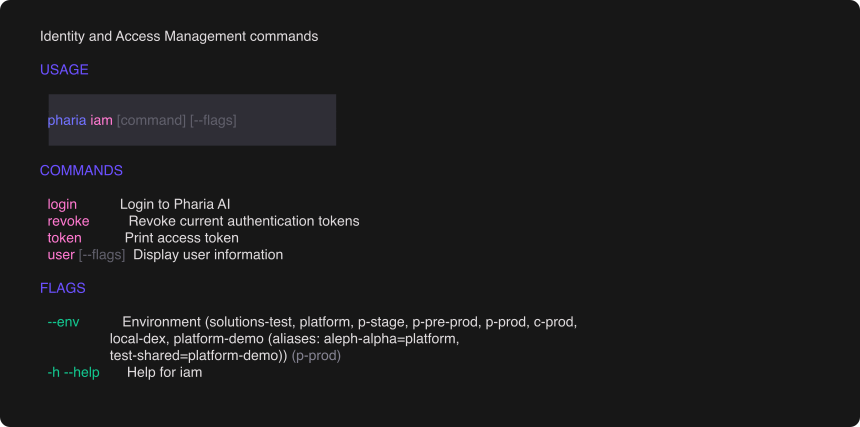
The platform CLI (pharia) handles authentication. Log in once; every subsequent command uses the cached token:
pharia iam login # one-time OAuth login via your browserSelect the environment with the global --env flag, for example pharia --env aleph-alpha iam login. The CLI caches tokens per environment and refreshes them automatically. To reach a deployment that the CLI does not know, pass --base-url https://sherlock.{ingressDomain} or set PHARIA_SHERLOCK_URL. To use the token in your own tooling, print it with TOKEN=$(pharia iam token).
Basic search
-
curl
-
Python SDK
-
Platform CLI
curl "$SHERLOCK_URL/api/v1/search-stores/<store-id>/searches" \
  -H "Authorization: Bearer $AA_TOKEN" \
  --json '{
    "requests": [
      {"query": "What is our refund policy?", "limit": 10}
    ]
  }'
results = store.search(query="What is our refund policy?", limit=10)
for hit in results:
print(f"{hit.score:.2f} {hit.chunk_id} {hit.text[:100]}")pharia --env aleph-alpha sherlock search <store-id> \
--query "What is our refund policy?" --limit 10By default, each hit contains the matching chunk’s text and chunk_id, a relevance score, and any metadata attached during ingestion. requests is a list, so you can send multiple independent queries in one call. The response contains one result list per request, in the same order. The Python search() method above wraps this batch body: it sends one request and returns its result list. store.batch_search(requests=[...]) sends several requests and returns all result lists. On the CLI, --query builds the same single-request batch and accepts --limit, --offset, and --filters. For all other options, pass the full batch body with --requests.
Per-request options: citations, rerank ({"model": ..., "candidates": ...} — retrieves a larger candidate set, scores it with a cross-encoder, and returns the top limit), fusion to override the store’s fusion strategy for this query (see Hybrid search), vectors to search with precomputed embeddings instead of a query string, and provider/rerank_provider to override the inference provider for the embedding and rerank calls. The response states for each request whether reranking ran.
Set citations to true on a request to also get the source document, file, page number, and layout position for every hit. Use this to show users the source of an answer:
-
curl
-
Python SDK
-
Platform CLI
curl "$SHERLOCK_URL/api/v1/search-stores/<store-id>/searches" \
  -H "Authorization: Bearer $AA_TOKEN" \
  --json '{
    "requests": [
      {
        "query": "What is our refund policy?",
        "limit": 10,
        "citations": true
      }
    ]
  }'
results = store.search(
query="What is our refund policy?",
limit=10,
citations=True,
)
for hit in results:
if hit.citation:
print(hit.citation.file_name, hit.citation.page_number)pharia --env aleph-alpha sherlock search <store-id> --requests '{
"requests": [
{
"query": "What is our refund policy?",
"limit": 10,
"citations": true
}
]
}'Hybrid search (dense + BM25)
A store with one dense entry and one bm25 entry runs every query against both: the query string is embedded and BM25-encoded in-process, and the two result sets are fused. See Creating search stores for how to declare the bm25 entry.
The store’s fusion_strategy determines how the dense and lexical results are combined. A per-request fusion overrides it for one query, which lets you compare strategies on the same store.
| Strategy | How dense and lexical results are combined |
|---|---|
|
Rank-based union |
|
Weighted sum of normalized scores — the default for a dense + bm25 pair whose dense entry uses |
|
The dense ranking determines the order; lexical scores only reorder results within a narrow score band |
|
Distribution-based score fusion |
|
Disables lexical search |
When a hybrid store answers without lexical search — for a vectors-only request, or a query whose lexical encoding is empty — the batch response sets that request’s entry in degraded. The field is omitted when no request in the batch was degraded; an empty string means the request was not degraded. A request that explicitly asks for dense_only is not marked.
|
Version availability
Hybrid |
Filtering results
Filters use Qdrant’s filter syntax: must (all conditions must match), should (at least one condition must match), and must_not (no condition may match). Each condition names a payload field with field and specifies a match or range:
-
curl
-
Python SDK
-
Platform CLI
curl "$SHERLOCK_URL/api/v1/search-stores/<store-id>/searches" \
  -H "Authorization: Bearer $AA_TOKEN" \
  --json '{
    "requests": [
      {
        "query": "quarterly revenue",
        "limit": 10,
        "filters": {
          "must": [
            {"field": "file_id", "match": {"value": "01JBRZ..."}},
            {"field": "metadata.language", "match": {"value": "en"}}
          ],
          "must_not": [
            {"field": "metadata.draft", "match": {"value": true}}
          ]
        }
      }
    ]
  }'
results = store.search(
query="quarterly revenue",
limit=10,
filters={
"must": [
{"field": "file_id", "match": {"value": "01JBRZ..."}},
{"field": "metadata.language", "match": {"value": "en"}},
],
"must_not": [
{"field": "metadata.draft", "match": {"value": True}},
],
},
)pharia --env aleph-alpha sherlock search <store-id> \
--query "quarterly revenue" --limit 10 \
--filters '{
"must": [
{"field": "file_id", "match": {"value": "01JBRZ..."}},
{"field": "metadata.language", "match": {"value": "en"}}
],
"must_not": [
{"field": "metadata.draft", "match": {"value": true}}
]
}'| Operator | Example |
|---|---|
|
|
|
|
|
|
|
|
|
|
The API also accepts two shorthand forms: the field name as the key ({"metadata.language": {"match": {"value": "en"}}}, or a bare bound like {"metadata.year": {"gte": 2024}}) and a bare value for exact match ({"metadata.language": "en"}).
|
Name the field with
fieldA condition written as |
What you can filter on
The platform adds the store’s isolation filter automatically, so your filter can only narrow results within your own store.
System fields — six IDs that every chunk carries and every collection indexes. You do not declare them; they are filterable in any store. Each one restricts the search to the vectors derived from that entity. The endpoints that return each value are relative to /api/v1/search-stores/<store-id>, and each has an SDK method and a CLI command of the same name:
| Field | Narrows the search to | Get the value from |
|---|---|---|
|
one uploaded file, across all its versions and pages |
|
|
one extracted document version of a file |
|
|
a single page of a document |
|
|
one specific chunk |
the |
|
everything ingested by one workflow |
|
|
everything ingested by one run of that workflow |
|
The most common case is searching within a single document: {"field": "file_id", "match": {"value": "<file-id>"}}. Use the two workflow fields to compare two ingestion configurations in the same store: run both, then filter each search to one workflow_run_id.
Your own metadata — any metadata your ingestion attached, filtered under the metadata. prefix: metadata.language, metadata.uri, metadata.draft. The prefix prevents collisions with the system fields: a metadata key named document_id is filtered as metadata.document_id and does not affect the system field. Metadata attached at file upload is stored under the user sub-namespace and filtered as metadata.user.<field>.
A metadata field is filterable only if the store declared it at creation; see declaring filterable metadata. A filter on an undeclared field is rejected with 400 and an error that names the field, because the vector database does not filter on unindexed fields. The check applies to must, should, must_not, and nested filters, in both the field form and the shorthand forms.
A malformed filter returns 400 Bad Request, not a server error; see Troubleshooting.
Troubleshooting
See Troubleshooting.