Using the PhariaFinetuning API
In addition to the finetuning features in the PhariaStudio portal, you can use the PhariaFinetuning API directly. The API consists of multiple routes that can be used to start, cancel, and list both running and previous jobs.
| The PhariaFinetuning API offers more configuration options than are available in the PhariaStudio portal. It also has a wider scope. |
Submitting a job using the Swagger UI
The PhariaFinetuning Swagger UI is accessible at:
https://pharia-finetuning-api.<YOUR_CONFIGURED_URL_POSTFIX>/docs/
where <YOUR_CONFIGURED_URL_POSTFIX> is the URL postfix configured during the installation of the PhariaFinetuning Helm chart.
1. Get token and authorise
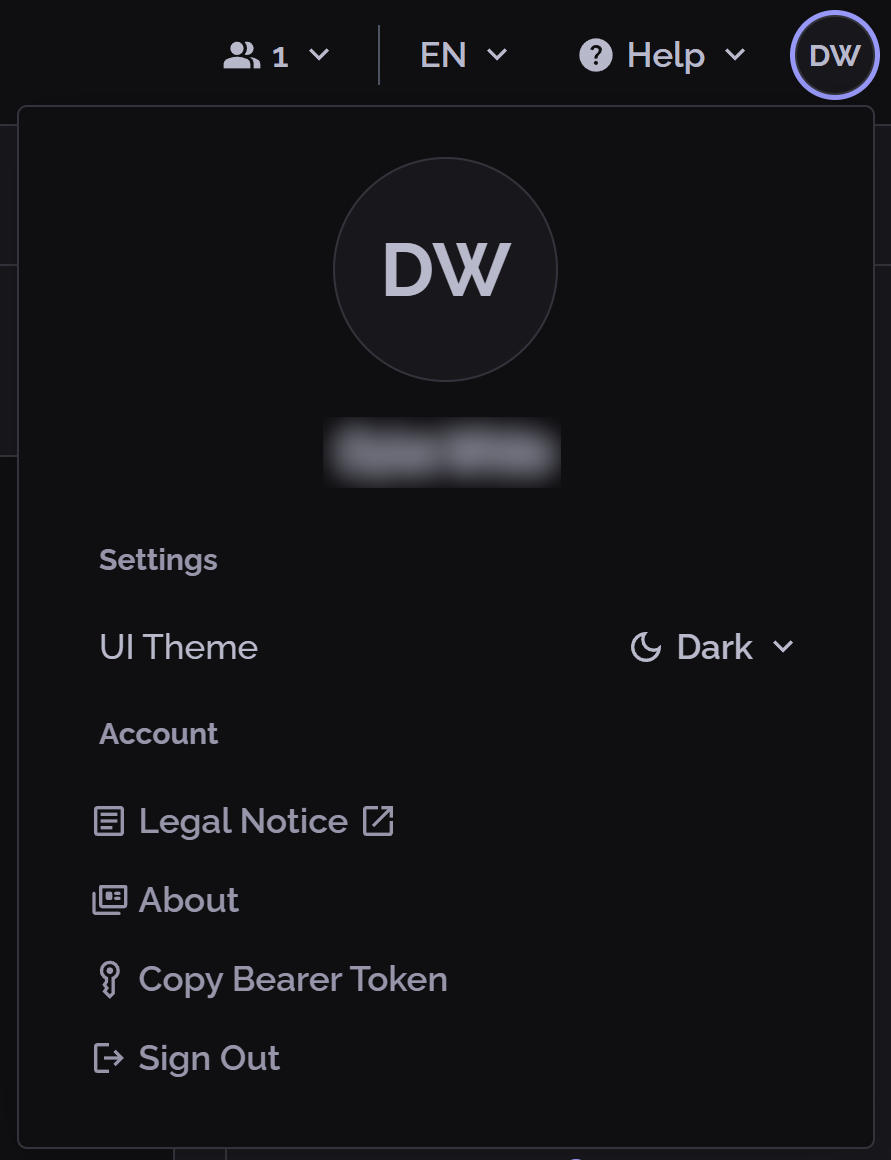
To use the Aleph Alpha APIs, you need a valid authorisation token. You get this in PhariaStudio, as follows:
-
Open PhariaStudio, and log in if necessary.
-
In the upper-right corner, click your profile icon.
-
In the popup, click Copy Bearer Token:
Next, you need to authorise yourself in the Swagger UI:
-
Click Authorize in the top-right corner of the Swagger UI.
-
Paste your token to authenticate.
-
After authorisation, you can close the popup window.
The API routes include a {project_id} parameter. Ensure that you have access to your desired project; if not, you cannot interact with finetuning jobs for that project.
2. Submit a job
To submit a finetuning job:
-
Click the
/api/v2/projects/{project_id}/finetuning/jobsendpoint to start a new job. -
Click Try it out to enter your parameters.
-
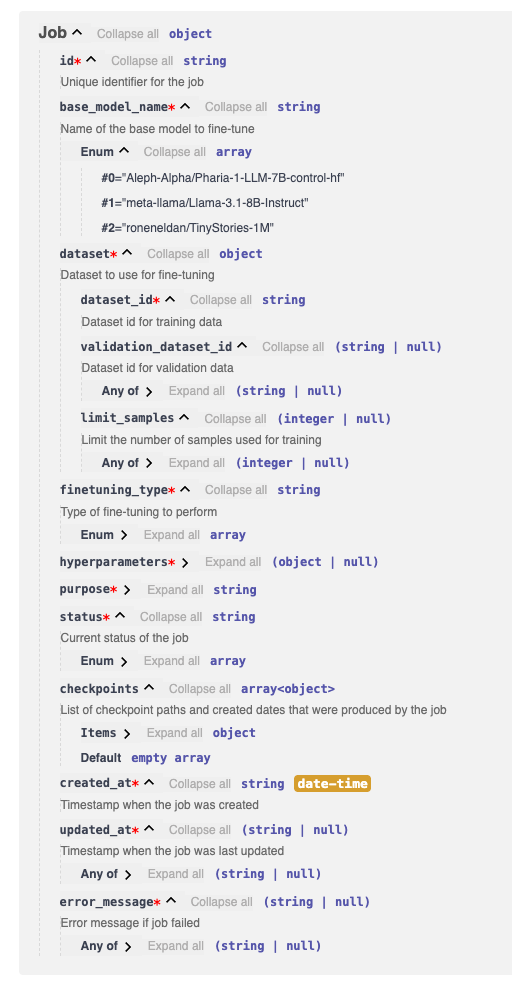
Fill in the request body with the necessary parameters:
a. Supported base models (base_model_name)
-
Aleph-Alpha/Pharia-1-LLM-7B-control-hf -
meta-llama/Llama-3.1-8B-Instruct -
roneneldan/TinyStories-1M
b. Dataset parameters
-
datasetis required (no default values). You can optionally setlimit_samplesto limit the number of samples to train on.
e. Configurable finetuning hyperparameters
-
n_epochs→ Number of epochs for training. -
learning_rate_multiplier→ Multiplier of the default learning rate (default lr = 2.0e-5). -
batch_size→ Size of per-device batches.-
Once submitted, you receive an
idthat uniquely identifies your finetuning job in the response underjob.id. This serves as the unique identifier for your job.
-
f. Evaluation configuration
-
dataset→ You can optionally setlimit_samplesto limit the number of samples to evaluate on. -
evaluation_interval→ Run evaluation everyevaluation_intervalepochs. Defaults to 1 (evaluation after every epoch). -
[BETA]
tasks→ Run custom PhariaEngine Skills on your evaluation dataset. Ataskis defined by anamespaceand askill_name. You can pass in multiple PhariaEngine Skills as tasks.
[BETA] Using PhariaEngine Skills for Evaluation
Your input schema for the Skill is expected to have the format shown below. Note the required input fields:
{
    "$defs": {
        "CriticModel": {
            "enum": [
                "llama-3.1-8b-instruct",
                "llama-3.3-70b-instruct",
                "deepseek-r1-distill-llama-8b",
                "deepseek-r1-distill-llama-70b-vllm"
            ],
            "title": "CriticModel",
            "type": "string"
        }
    },
    "properties": {
        "evaluation_model": {
            "$ref": "#/$defs/CriticModel"
        },
        "ground_truth": {
            "title": "Ground Truth",
            "type": "string"
        },
        "instruction": {
            "title": "Instruction",
            "type": "string"
        },
        "response": {
            "title": "Response",
            "type": "string"
        }
    },
    "required": [
        "instruction",
        "response",
        "ground_truth",
        "evaluation_model"
    ],
    "title": "DataTestCaseWithModel",
    "type": "object"
}
The expected output schema for the Skill is expected to have the format shown below. Note the required output fields:
{
    "$defs": {
        "Metric": {
            "properties": {
                "aggregation_method": {
                    "enum": [
                        "mean",
                        "sum",
                        "min",
                        "max"
                    ],
                    "title": "Aggregation Method",
                    "type": "string"
                },
                "data_type": {
                    "enum": [
                        "int",
                        "float",
                        "bool"
                    ],
                    "title": "Data Type",
                    "type": "string"
                },
                "description": {
                    "title": "Description",
                    "type": "string"
                },
                "metric_name": {
                    "title": "Metric Name",
                    "type": "string"
                },
                "reason": {
                    "title": "Reason",
                    "type": "string"
                },
                "value": {
                    "anyOf": [
                        {
                            "type": "integer"
                        },
                        {
                            "type": "number"
                        },
                        {
                            "type": "boolean"
                        }
                    ],
                    "title": "Value"
                }
            },
            "required": [
                "metric_name",
                "description",
                "data_type",
                "aggregation_method",
                "value",
                "reason"
            ],
            "title": "Metric",
            "type": "object"
        }
    },
    "properties": {
        "metrics": {
            "items": {
                "$ref": "#/$defs/Metric"
            },
            "title": "Metrics",
            "type": "array"
        }
    },
    "required": [
        "metrics"
    ],
    "title": "EvaluationOutput",
    "type": "object"
}
You can check whether these match by calling https://pharia-kernel.<YOUR_CONFIGURED_URL_POSTFIX>.com/v1/skills/{namespace}/{skill_name}/metadata of your Skill.
Viewing job statuses
The PhariaFinetuning API allows you to check the status of all jobs (running, canceled, or failed) or view details for a specific job.
View the statuses of all jobs
To get a list of all jobs and their statuses, use the /api/v2/projects/{project_id}/finetuning/jobs endpoint in Swagger UI.
-
Since this is a GET route, click Try it out, and then Execute.
-
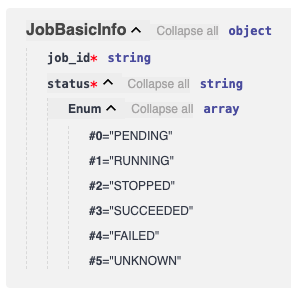
The response is a single JSON object containing job details as
JobBasicInfoschema.
View the status of a single job
To get the status of a specific job, use the /api/v2/projects/{project_id}/finetuning/jobs/{job_id} endpoint.
-
Since this is a POST route, click Try it out.
-
Enter the
job_idyou want details for and click Execute. -
The response is a JSON array containing job details and statuses.
The schema of the response JobInfoResponse is as follows: