Translation
In PhariaAssistant, you can translate text instantly with the Translation application.
Translating text
To translate source text:
-
Type or paste your text into the input field of the source pane.
-
Select a source language from the Source language dropdown list in the source pane.
-
Select a target language from the Target language in the translation pane.
The translation automatically appears in the translation pane.
If you change your target language after the translation has been completed, a new translation is automatically generated for the new language.
Editing a translation
You can edit the translated text simply by clicking inside the translation and changing the text as required.
Note that changes you make in the translated text do not change the source text.
Copying a translation
You can copy the translated text by clicking the copy icon  at the bottom right of the translation pane. The translated text is copied into the buffer, and you can paste it elsewhere.
Swapping the translation languages
You can swap the translation languages by clicking the swap icon  between the source and translation panes. The translated text is copied into the source, and a new translation is generated.
Clearing the source text
You can delete the source text and its translation by clicking the delete icon  in the source area:
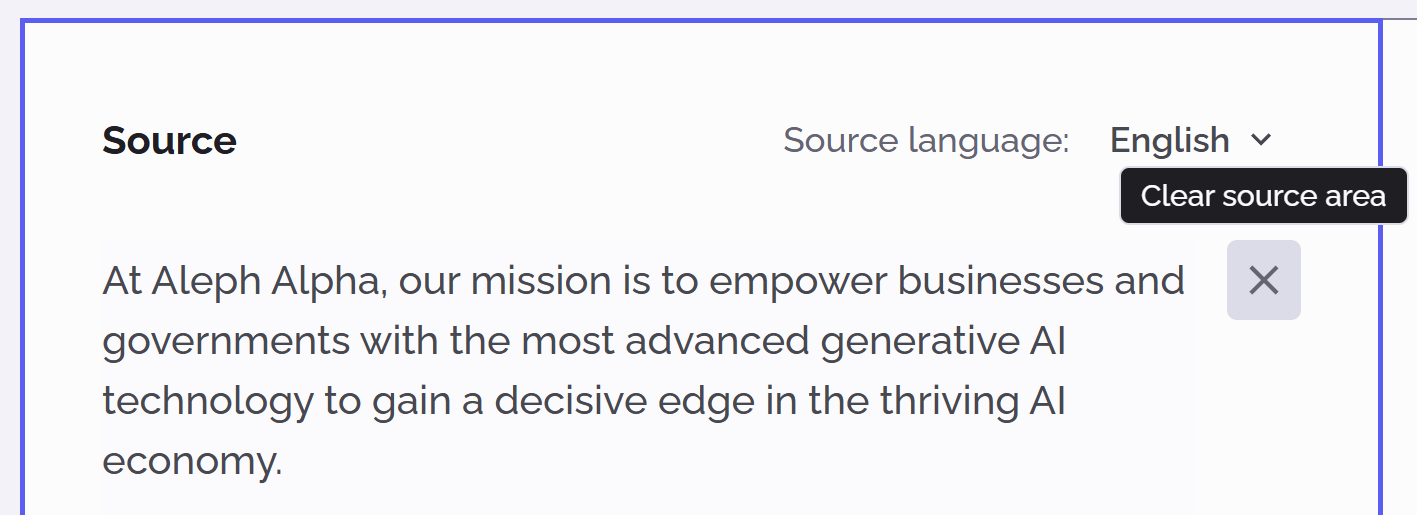
The source text and translation are immediately deleted.
Supported languages
The Translation application supports the following languages:
Albanian
Arabic
Bosnian
Bulgarian
Croatian
Czech
Danish
Dutch
English
Estonian
Finnish
French
German
Greek (Modern)
Hebrew (Modern)
Hungarian
Indonesian
Irish
Italian
Japanese
Korean
Latvian
Lithuanian
Macedonian
Malay
Maltese
Norwegian
Persian
Polish
Portuguese
Romanian
Russian
Serbian
Slovak
Slovenian
Spanish
Swedish
Thai
Turkish
Ukrainian
Vietnamese