Semantic embed
For background information about this feature, see our recent blog-post about Luminous-Explore, which introduces the model behind the semantic_embed endpoint.
|
Introduction
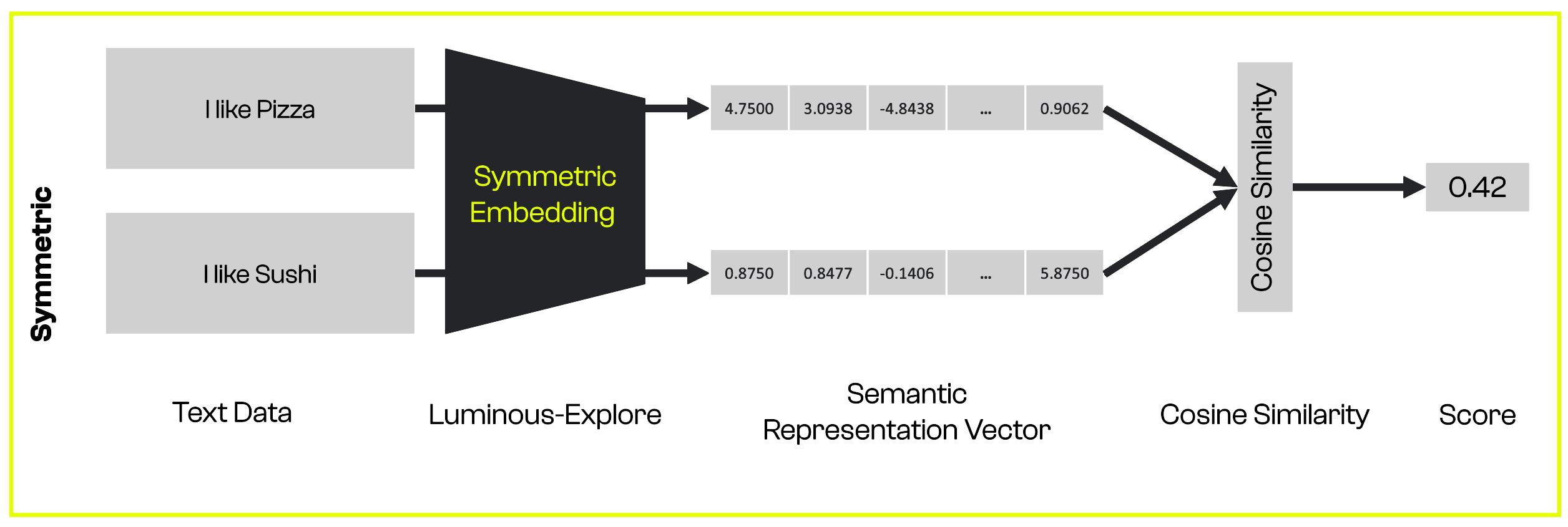
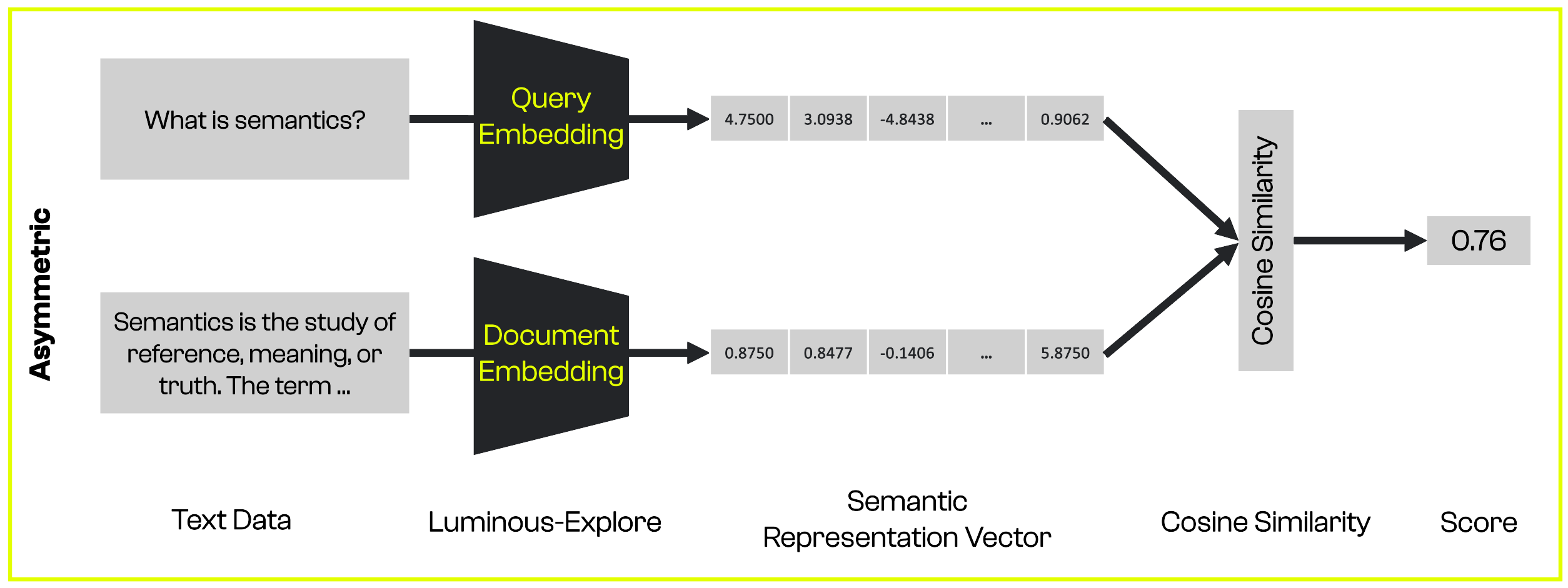
The semantic_embed endpoint is used to create semantic embeddings for your text. You can apply the endpoint in two ways:
-
If you have texts with different structures, such as a
documentand aquery, you can use asymmetric embeddings. -
If you have texts with similar structures, you can use symmetric embeddings.
The illustrations below show how they differ and what a workflow with semantic embeddings might look like.
Code examples
Before we demonstrate how to use symmetric and asymmetric embeddings, we define a function to calculate the cosine similarity of two vectors. You can use any similar function from the package of your choice.
import math
def compute_cosine_similarity(
    embedding_1,
    embedding_2
):
    sumxx, sumxy, sumyy = 0, 0, 0
    for i in range(len(embedding_1)):
        x = embedding_1[i]
        y = embedding_2[i]
        sumxx += x * x
        sumyy += y * y
        sumxy += x * y
    return sumxy / math.sqrt(sumxx * sumyy)
The following code snippet demonstrates how you can use symmetric embeddings for texts with a similar structure:
import os
from aleph_alpha_client import Client, Prompt, SemanticRepresentation, SemanticEmbeddingRequest
# If you are using a Windows machine, you must install the python-dotenv package and run the two below lines as well.
# from dotenv import load_dotenv
# load_dotenv()

client = Client(token=os.getenv("AA_TOKEN"))
texts = [
    "The gray wolf is a large carnivorous mammal.",
    "Wolves hunt in packs.",
    "I take the train to work everyday."
]

symmetric_embeddings = []

for text in texts:
    symmetric_params = {
        "prompt": Prompt.from_text(text),
        "representation": SemanticRepresentation.Symmetric,
        "compress_to_size": 128
    }
    symmetric_request = SemanticEmbeddingRequest(**symmetric_params)
    symmetric_response = client.semantic_embed(request=symmetric_request, model="luminous-base")
    symmetric_embeddings.append(symmetric_response.embedding)

print("""'{text_1}' and '{text_2}' similarity: {score_1}
'{text_2}' and '{text_3}' similarity: {score_2}
'{text_1}' and '{text_3}' similarity: {score_3}""".format(
    text_1 = texts[0],
    text_2 = texts[1],
    text_3 = texts[2],
    score_1 = compute_cosine_similarity(symmetric_embeddings[0], symmetric_embeddings[1]),
    score_2 = compute_cosine_similarity(symmetric_embeddings[1], symmetric_embeddings[2]),
    score_3 = compute_cosine_similarity(symmetric_embeddings[0], symmetric_embeddings[2])
))
# prints:
# 'The gray wolf is a large carnivorous mammal.' and 'Wolves hunt in packs.' similarity: 0.601247315089725
# 'Wolves hunt in packs.' and 'I take the train to work everyday.' similarity: 0.04440147971258914
# 'The gray wolf is a large carnivorous mammal.' and 'I take the train to work everyday.' similarity: -0.12290839164669595
The next code snippet demonstrates how you can use asymmetric embeddings for texts with a dissimilar structure:
import os
from aleph_alpha_client import Client, Prompt, SemanticRepresentation, SemanticEmbeddingRequest

query_text = "When did wolves first appear in the fossil record?"
documents = [
    "The gray wolf (Canis lupus) is a species of placental mammal of the carnivore order. The earliest fossil record dates back eight hundred thousand years. Wolves are native to North America and Eurasia, where they were once widely distributed and abundant. Today, they inhabit only a very limited portion of their former territory.",
    "Game theory is a discipline concerned with mathematical models of strategic interaction between rational actors. Game theory is applied in various areas of the social sciences as well as in logic, systems theory, and computer science. Although it originally focused on zero-sum games in which each participant's gains or losses are perfectly balanced by those of the others, modern game theory applies to a wide range of behavioral relationships."
]

query_params = {
    "prompt": Prompt.from_text(query_text),
    "representation": SemanticRepresentation.Query,
    "compress_to_size": 128
}
query_request = SemanticEmbeddingRequest(**query_params)
query_response = client.semantic_embed(request=query_request, model="luminous-base")
query_embedding = query_response.embedding

document_embeddings = []

for document in documents:
    document_params = {
        "prompt": Prompt.from_text(document),
        "representation": SemanticRepresentation.Document,
        "compress_to_size": 128
    }
    document_request = SemanticEmbeddingRequest(**document_params)
    document_response = client.semantic_embed(request=document_request, model="luminous-base")
    document_embeddings.append(document_response.embedding)

print("""query_text and document_1 similarity: {score_1}
query_text and document_2 similarity: {score_2}""".format(
    score_1 = compute_cosine_similarity(query_embedding, document_embeddings[0]),
    score_2 = compute_cosine_similarity(query_embedding, document_embeddings[1])
))
# prints:
# query_text and document_1 similarity: 0.5142405613255223
# query_text and document_2 similarity: -0.13230054712395245
When to use embeddings vs. semantic embeddings?
The embedding endpoint should be used as a feature input for downstream models (such as classifiers).
Cases in which the semantic meaning of a text matters, such as semantic search systems or Chat applications, can benefit from the semantic embedding endpoint.
What is the difference between embeddings and semantic embeddings?
Embeddings are the pooled activations for the input tokens at the layer of your choice. While the embedding representation has some semantic meaning, semantic embeddings have been optimised to find semantic relationships between two inputs (text and image).
This optimisation was achieved by training additional layers using datasets curated for this task and a contrastive loss. An optional dimensionality reduction layer reduces the embedding dimension to a 128-dimensional vector, making it more efficient to compare two vectors.
Code example: Attention manipulation
You can also create semantic embeddings with our attention manipulation method, AtMan. For example, you may want to use asymmetric semantic embeddings to find a gaming console among a set of product descriptions.
Without attention manipulation, the query scores nearly equally against both documents:
import os
import re
import math
from aleph_alpha_client import (
    Client,
    Prompt,
    SemanticEmbeddingRequest,
    SemanticRepresentation,
    TextControl,
)

# If you are using a Windows machine, you must install the python-dotenv package and run the two below lines as well.
# from dotenv import load_dotenv
# load_dotenv()

def compute_cosine_similarity(
    embedding_1,
    embedding_2
):
    sumxx, sumxy, sumyy = 0, 0, 0
    for i in range(len(embedding_1)):
        x = embedding_1[i]
        y = embedding_2[i]
        sumxx += x * x
        sumyy += y * y
        sumxy += x * y
    return sumxy / math.sqrt(sumxx * sumyy)

client = Client(token=os.getenv("AA_TOKEN"))

query_text = "I want to play on my TV."

documents = [
    "Your favorite movies and TV programs are automatically upscaled to 4K using our new 4K upscaling technology. You can quickly discover content and navigate streaming services with our entertainment hub via the internet.",
    "Experience unbelievable adventures with our new gaming console. Just plug your console into your TV to enjoy more than 130 fps and connect to the internet for unlimited gaming fun."
]

query_params = {
    "prompt": Prompt.from_text(query_text),
    "representation": SemanticRepresentation.Query,
    "compress_to_size": 128
}
query_request = SemanticEmbeddingRequest(**query_params)
query_response = client.semantic_embed(request=query_request, model="luminous-base")
query_embedding = query_response.embedding

document_embeddings = []

for document in documents:
    document_params = {
        "prompt": Prompt.from_text(document),
        "representation": SemanticRepresentation.Document,
        "compress_to_size": 128
    }
    document_request = SemanticEmbeddingRequest(**document_params)
    document_response = client.semantic_embed(request=document_request, model="luminous-base")
    document_embeddings.append(document_response.embedding)

print("""query_text and document_1 similarity: {score_1}
query_text and document_2 similarity: {score_2}""".format(
    score_1 = compute_cosine_similarity(query_embedding, document_embeddings[0]),
    score_2 = compute_cosine_similarity(query_embedding, document_embeddings[1])
))

# prints:
# query_text and document_1 similarity: 0.44637539708542545
# query_text and document_2 similarity: 0.44946165354098017
With attention manipulation, we can steer the model into a more helpful direction. We amplify the word "play" in the query to find the product description matching a gaming console:
import os
import re
import math

from aleph_alpha_client import (
    Client,
    Prompt,
    SemanticEmbeddingRequest,
    SemanticRepresentation,
    TextControl,
)

# If you are using a Windows machine, you must install the python-dotenv package and run the two below lines as well.
# from dotenv import load_dotenv
# load_dotenv()

def compute_cosine_similarity(
    embedding_1,
    embedding_2
):
    sumxx, sumxy, sumyy = 0, 0, 0
    for i in range(len(embedding_1)):
        x = embedding_1[i]
        y = embedding_2[i]
        sumxx += x * x
        sumyy += y * y
        sumxy += x * y
    return sumxy / math.sqrt(sumxx * sumyy)

client = Client(token=os.getenv("AA_TOKEN"))

query_text = "I want to play on my TV."

documents = [
    "Your favorite movies and TV programs are automatically upscaled to 4K using our new 4K upscaling technology. You can quickly discover content and navigate streaming services with our entertainment hub via the internet.",
    "Experience unbelievable adventures with our new gaming console. Just plug your console into your TV to enjoy more than 130 fps and connect to the internet for unlimited gaming fun."
]

matching_string = re.search("play", query_text)

begin_match = matching_string.regs[0][0]
end_match = matching_string.regs[0][1]

control = TextControl(start=begin_match, length=end_match-begin_match, factor=7)

query_params = {
    "prompt": Prompt.from_text(query_text, controls=[control]),
    "representation": SemanticRepresentation.Query,
    "compress_to_size": 128
}
query_request = SemanticEmbeddingRequest(**query_params)
query_response = client.semantic_embed(request=query_request, model="luminous-base")
query_embedding = query_response.embedding

document_embeddings = []

for document in documents:
    document_params = {
        "prompt": Prompt.from_text(document),
        "representation": SemanticRepresentation.Document,
        "compress_to_size": 128
    }
    document_request = SemanticEmbeddingRequest(**document_params)
    document_response = client.semantic_embed(request=document_request, model="luminous-base")
    document_embeddings.append(document_response.embedding)

print("""query_text and document_1 similarity: {score_1}
query_text and document_2 similarity: {score_2}""".format(
    score_1 = compute_cosine_similarity(query_embedding, document_embeddings[0]),
    score_2 = compute_cosine_similarity(query_embedding, document_embeddings[1])
))

# prints:
# query_text and document_1 similarity: 0.3567054956894866
# query_text and document_2 similarity: 0.4028220746612426