Sharing inference in a multi-tenant installation
This article describes the scenario where multiple PhariaAI installations (tenants) are planned within one larger organisation, but where the PhariaInference API is shared between them from a separate installation.
Introduction
In a multi-tenant installation, each installation has individual user management, allowing independent administration of separate user bases. Considering the hardware cost, it may be beneficial to operate a shared installation running the PhariaInference API instead of running it in each installation individually.
Requests that are successfully authenticated in the individual tenant can be forwarded to a shared PhariaInference installation by a proxy running within the tenant.
Using the proxy or a real PhariaInference installation appears the same to clients. However, within a single installation, both must not be enabled at the same time.
Environment overview
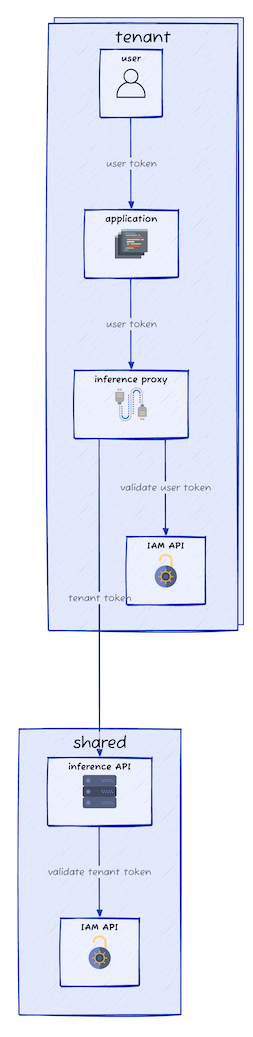
In addition to each tenant PhariaAI installation environment, we need a shared environment running the PhariaInference service as well as an IAM service to authenticate the individual tenants. As a result, the shared environment and each tenant environment require a running IAM service per environment.
The process is as follows:
-
A user within the tenant creates a request towards the PhariaInference proxy service.
-
The proxy service validates the supplied token against the tenant’s IAM service and then forwards the request to the shared PhariaInference service, adding the configured tenant service user’s authentication.
-
The PhariaInference service then validates these credentials against the IAM service within the shared installation.
From the perspective of the shared PhariaInference service, all requests from this particular tenant use the same service user credentials.
The following diagram shows the proxy configuration for the shared inference set-up:
From a technical perspective, the shared installation is a regular PhariaAI installation with one service user per tenant, interacting as a regular user with the PhariaInference API. If only PhariaInference is used by the tenants and their applications, the other services can be disabled in the shared installation.
Installing the shared PhariaInference
Follow the regular installation instructions, but disable all services not needed in the shared namespace. The IAM service and PhariaInference service are required. Ensure that inference is enabled and the desired models have been configured:
global:
  inference:
    enabled: true
For each planned tenant, add an entry to the pharia-iam section in the shared installation’s values-override-shared.yaml to create a service user which the tenant can use to authenticate against the shared PhariaInference:
pharia-iam:
  config:
    serviceUsers:
      tenant1:
        name: "Tenant 1"
        description: "Service user for tenant 1"
        roles: ["InferenceServiceUser"]
The service user (tenant1 in this example) defines in which secret the credentials are stored. We need to provide these credentials to the tenant installation later.
Service user credentials
The proxy requires access to the shared PhariaInference API. Get the credentials from the secret created in the shared installation context and keep them for later:
# in the shared context, ensure the correct namespace is selected
kubectl get secret pharia-iam-service-user-tenant1 -o json | jq -r '.data.token | @base64d'
Installing a tenant
Now we can set up a tenant environment. First we provide the credentials obtained before. Then we install PhariaAI with the proxy enabled.
Credentials to access the shared API
In the tenant environment, create a new secret inference-api-proxy-secret containing the token obtained from the service user and the URL of the shared PhariaInference API:
# in the tenant context
TENANT1_SERVICE_USER_TOKEN="insert from service user"
SHARED_API="https://inference-api.shared.example.com"
kubectl create secret generic inference-api-proxy-secret --from-literal=remote-inference-api-url=$SHARED_API --from-literal=remote-inference-api-token=$TENANT1_SERVICE_USER_TOKEN
Configuration
Install the tenant in its own namespace or another cluster, following the regular installation instructions, but disable inference in the tenant’s values-override-tenant.yaml. Enable inference-api-proxy instead:
global:
  inference:
    enabled: false

inference-api-proxy:
  enabled: true
Any custom network policies must allow the inference-api-proxy pod to access the shared PhariaInference API.
Verification
To verify that the configuration is correct, issue requests to the proxy acting as a user within the tenant:
TENANT_INFERENCE_PROXY_URL="https://inference-api.tenant.example.com"
USER_TOKEN="set me"

# unauthenticated request
curl $TENANT_INFERENCE_PROXY_URL/version
If the SHARED_API has been configured correctly, this returns a semantic version.
Obtain a user token for the tenant environment and send an authenticated request:
# authenticated request
curl -H "Authorization: Bearer $USER_TOKEN" $TENANT_INFERENCE_PROXY_URL/model-settings
If this returns the models configured in the shared PhariaInference installation, the user authentication as well as the authentication of the proxy towards the shared API have been configured correctly.