PhariaAI v1.251000.0 – Release Notes
| Release Version | v1.251000.0 |
| Release Date | October 1, 2025 |
| Availability | On-premise and hosted |
PhariaAssistant
This release introduces major enhancements to PhariaAssistant, expanding flexibility, transparency, and productivity in everyday workflows. With new capabilities like Agentic Chat Modes, Personal Agents, Inline Citations & Reference Scores (BETA), and standardized Chat Tool Selection (BETA), teams can tailor chat experiences, conduct structured research, verify sources, and integrate tools seamlessly - empowering users to work smarter and faster across tasks and domains.
Agentic Chat Modes: Flexible chat experience tailored to task needs
| Availability | On-premise and hosted |
Agentic Chat is extended with Chat Modes. It’s now possible to choose one of the following Chat modes:
-
Express - a general purpose chat experience with fast responses;
-
Smart - a chat experience that thinks and reasons more thoroughly, breaking down tasks to use specialized tools and agents.
Key Benefits:
-
Performance adaptability: Easily adapt chat performance to the task: fast, smart, or deep research.
-
Variety of add-ons: Attach tools, documents, and agents directly from the prompt field.
Some collaboration options (e.g. in Deep Research mode) are still under validation and may not be fully available yet.
Personal Agents: Build AI agents tailored to your workflows
| Availability | On-premise and hosted |
Personal Agents let users create, customize, and reuse AI chat agents tailored to specific tasks or domains. Each agent can be configured with its own instructions and knowledge, enabling users to switch from a single general-purpose chat to multiple agents optimized for different workflows.
Agents can be created directly in Chat or from the Agents tab in the sidebar. Once created, users can select an agent in Chat to instantly apply its context.
The Assistant may also suggest creating a new agent when it detects repeated workflows.
Key Benefits:
-
Tailored to workflows: Each agent can be customized with its own instructions, and knowledge, so it reflects how the customer’s team actually works;
-
Faster time-to-value: Users test ideas immediately, without waiting for developer resources or custom builds;
-
Automated suggestions: The system can propose when an agent should be created if repetitive workflows are detected;
-
Better task fit: Personal agents reflect each user’s unique workflows and daily needs, reducing manual effort in downstream processes and improving overall flow.
Currently limited to simple, single-purpose agents without advanced workflows, deep integrations, or team-level sharing.
Inline Citations & Reference Scores: Transparent source attribution alongside conversational responses
Inline Citations & Reference Scores feature is currently available as a BETA release, allowing users to explore its features while certain capabilities are still under development and might not work as intended.
| Availability | On-premise and hosted |
Key Benefits:
-
Source Transparency: Inline citations make it immediately clear which sources support or contradict specific points in chat responses;
-
Enhanced Verification: Relevancy scores and highlighted document chunks allow users to quickly assess the reliability and importance of references;
-
Improved Productivity: Expanded UI space and better source interaction reduce manual search effort and streamline the verification of information.
Chat Tool Selection: Standardized access to tools and web search
Chat Tool Selection is currently available as a BETA release, allowing users to explore its features while certain capabilities are still under development and might not work as intended.
| Availability | On-premise and hosted |
Chat Tool Selection is available in PhariaAssistant Chat, enabling users to select, configure, and use tools in a standardized way through the MCP protocol.
The feature allows users to access all available tools directly in Chat via a unified interface or “/” commands, providing flexibility to include or exclude specific tools for each task. MCP standardization ensures tools can be deployed, updated, and integrated across different PhariaAI applications while supporting role-based permissions, audit trails, and federated tool registries.
Key Benefits:
-
Unified Tool Access: Select from a standardized set of tools and collections directly in chat for seamless task execution.
-
Flexible Integration: MCP standardization ensures interoperability, authentication, and role-based access across multiple applications and environments.
-
Enhanced Productivity: Orchestrate complex queries using multiple tools while maintaining clear audit trails and permission control.
Advanced multi-server MCP configurations and write-access permission enforcement are still in development and may not be fully available in the initial release.
PhariaStudio
Introducing OTEL Collector and Visualizer support in Studio, bringing OpenTelemetry-based tracing to improve AI engineer debugging and observability.
OpenTelemetry Collector And Visualizer: Seamlessly connect to observability platforms with standard telemetry formats
| Availability | On-premise and hosted |
Developers can now trace PhariaAI applications using the OpenTelemetry (OTEL) standard alongside existing proprietary tracing. Both development and production tracing are supported, ensuring engineers can debug locally and monitor live applications. Access controls ensure that users only see traces from projects and applications they’re authorized for.
Key Benefits:
-
Open Standards: Use familiar OpenTelemetry collectors and visualizers instead of proprietary tracing;
-
Flexibility: Integrates easily with open-source and third-party observability tools;
-
Backwards Compatibility: No migration needed; existing proprietary tracing continues to work.
PhariaOS
This release introduces a foundational enhancement, empowering users and developers with greater control and governance capabilities.
System Configuration: Manage system settings and PhariaAssistant behavior via a unified UI or API
| Availability | On-premise and hosted |
The System Configuration feature introduces a centralized framework for managing global settings and PhariaAssistant behavior, accessible through both a user-friendly frontend interface and a programmable API. Users can now adjust model behavior, enforce data retention policies, set compliance attributes, and customize chat tone or fallback instructions directly in PhariaOS. For advanced use cases, the API allows automation, bulk updates, and integration with external systems. This unifies configuration workflows previously split between frontend and backend, reducing complexity and improving operational efficiency.
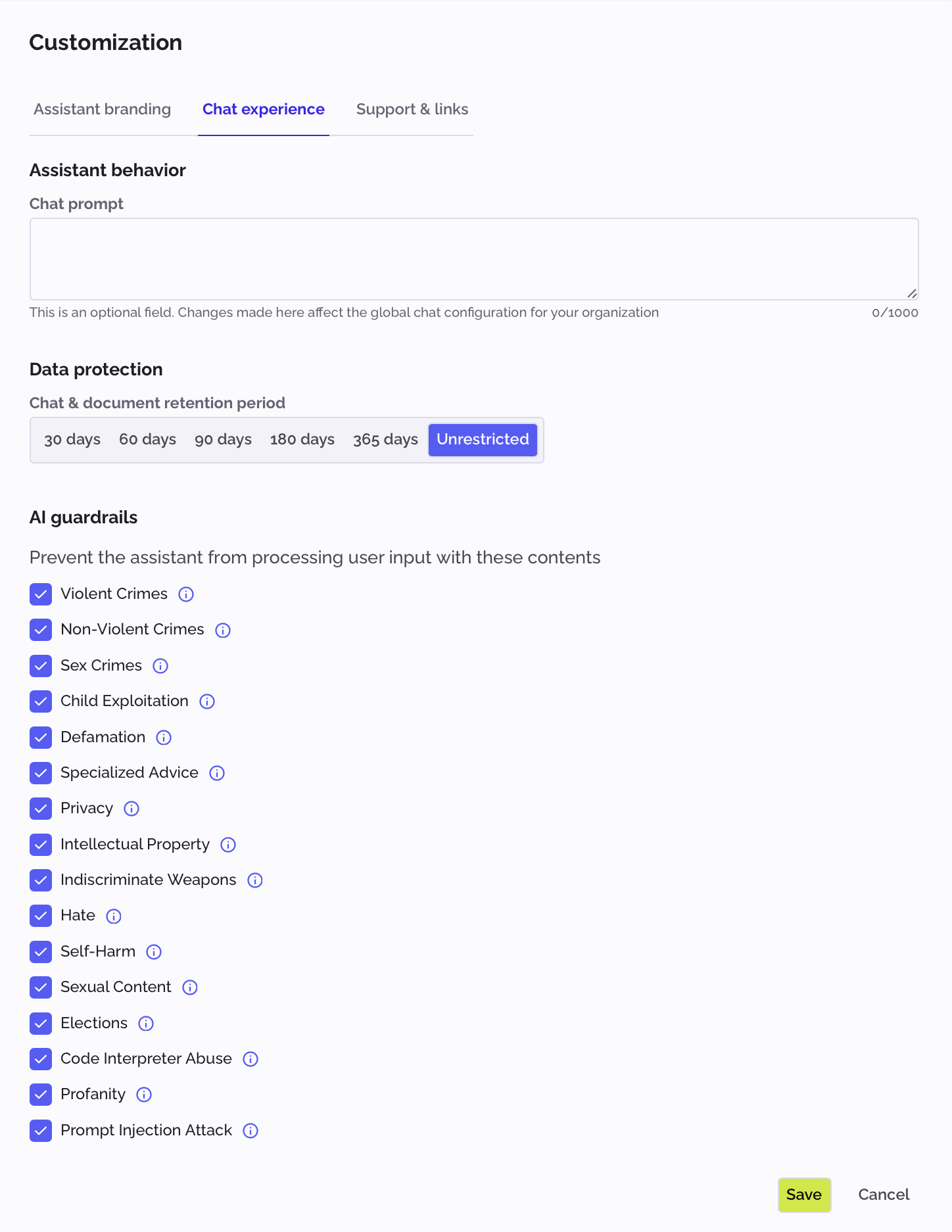
Key Benefits:
-
Ease of Use: Admins can interactively adjust settings via a clear frontend interface without technical expertise;
-
Flexibility: Support for both manual frontend changes and automated API-driven configurations to meet diverse operational needs;
-
Unified Framework: Combines frontend and backend enablement into a single system, streamlining setup and reducing errors.
Advanced configuration options may still require backend/API access, real-time frontend validation is limited for complex parameters, and API-driven changes might not immediately reflect in the UI without manual refresh.
Other updates
- Starting with this release, the Inference API now automatically reloads modified configurations, removing the need for manual restarts and ensuring smoother updates;
- Starting with this release, users can view, configure, edit, and delete OAuth client configurations for SharePoint and Google Drive directly in PhariaOS UI. This provides a simple and secure way to register connectors, manage credentials, and ensure correct access permissions for external data sources.